
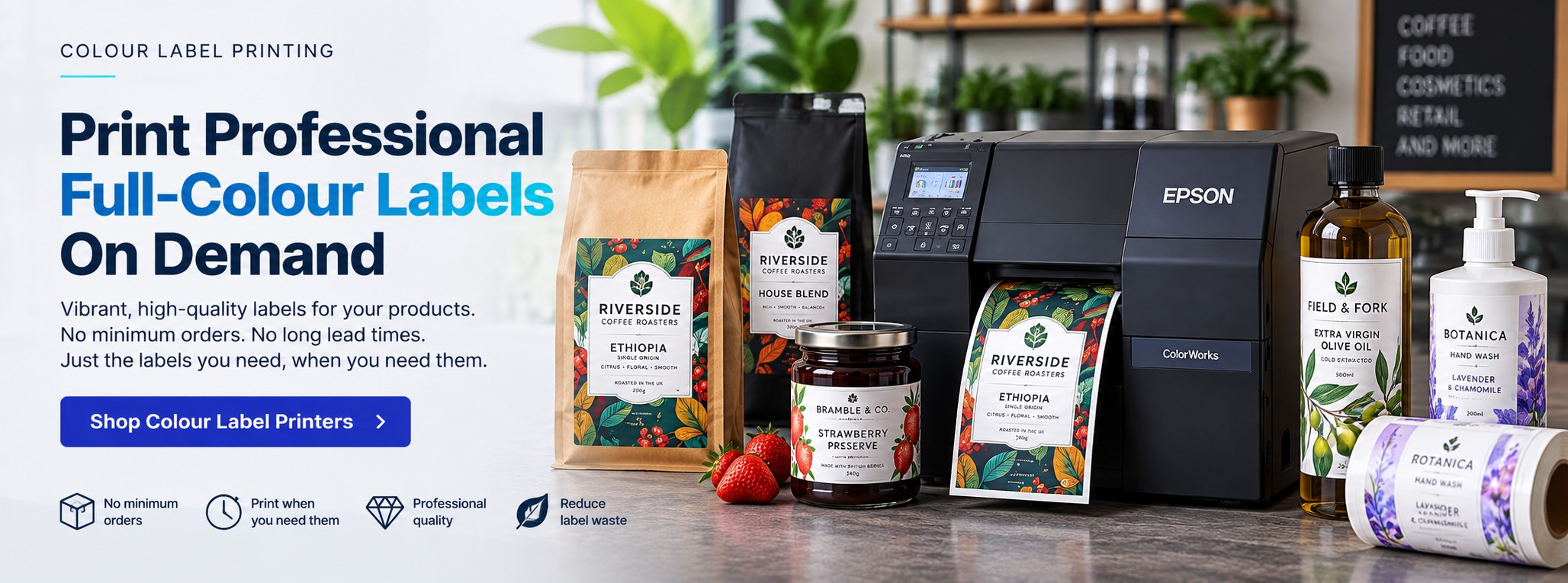
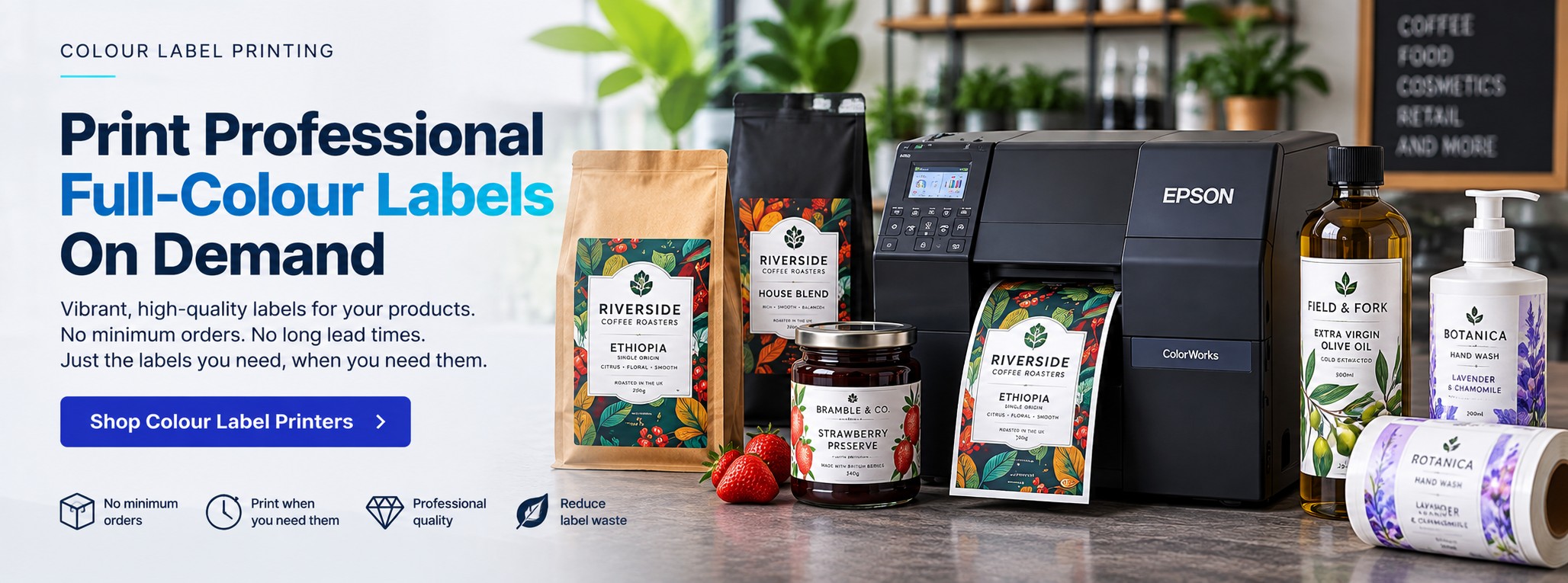
Colour Label Printing – Print Professional Labels In-House and On-Demand
Print professional full-colour product labels in-house, on demand, with Epson ColorWorks. Produce the labels you need, when you need them, without relying on large quantities of pre-printed stock or waiting for outsourced print runs.
Whether you're printing a handful of labels for a new product, short runs for seasonal ranges or regular batches across multiple SKUs, on-demand colour label printing gives you greater control over production, artwork and quantities.
Tek Direkt supplies professional Epson ColorWorks colour label printers for businesses looking to bring label production in-house. From food and drink to cosmetics, candles, retail and manufacturing, we can help you choose a printer suited to your label sizes, materials and print volumes.
Why Bring Colour Label Printing In-House?
Print What You Need
Produce labels according to current demand instead of predicting quantities weeks or months in advance.
Short Runs
Print smaller batches for new products, seasonal ranges, limited editions and product trials.
Change Labels Quickly
Update artwork, ingredients, product information, branding or promotions before the next print run.
Multiple SKUs
Use one printing platform to support many products, variants, flavours, sizes and label designs.
Reduce Obsolete Stock
Reduce the risk of being left with large quantities of pre-printed labels when something changes.
Full-Colour Branding
Combine logos, graphics, photographs and product information in one professional label.
Barcodes & QR Codes
Incorporate suitable machine-readable codes directly into your label artwork.
Faster Product Launches
Produce labels internally rather than waiting for another external print order to arrive.
From Blank Label to Finished Product
Instead of buying a different roll of pre-printed labels for every product, compatible blank label media can be printed digitally as required.
1
Create the Artwork
Prepare the complete label containing branding, graphics and product information.
2
Load Label Media
Use compatible blank labels in the required size, material and finish.
3
Print On Demand
Select the design and print the quantity required for the current production run.
4
Apply the Labels
Apply manually or integrate printing into a suitable production workflow as volumes increase.
What Are You Labelling?
Colour label printing is particularly valuable where products change regularly, branding matters or businesses manage multiple SKUs.
Coffee Roasters
Print labels for single origins, blends, micro-lots, subscriptions, decaf and seasonal coffees.
Coffee Label Printing →Jams, Sauces & Preserves
Create labels for jams, chutneys, sauces, honey, pickles, relishes and other jarred foods.
Jarred Food Label Printing →Skincare & Soap
Produce branded labels for soaps, skincare products, creams, oils and changing product ranges.
Candles & Wax Melts
Print labels for different fragrances, ranges, sizes, seasonal products and limited editions.
Pet Products
Create professional labels for pet treats, grooming products, pet foods and suitable pet-care products.
Farm Shops & Delis
Bring labels for own-brand and locally produced products in-house across a varied product range.
Plant & Nursery Labels
Produce full-colour plant and horticultural labels where suitable media is required to withstand moisture and outdoor handling.
Waterproof Plant Label Printing →Manufacturing
Use colour for product identification, components, variable information and suitable industrial applications.
More Colour Label Printing Applications
Food & Beverage
Product labels combining branding with ingredients, product details, barcodes and other required information.
Visitor Badges
Print photographs, visitor names, company information, branding, QR codes and colour-coded passes.
Visitor Badge Printing →GHS Chemical Labels
Produce suitable colour chemical labels incorporating product identification, GHS hazard pictograms and variable information where the complete printer, ink and media system is appropriate for the application.
GHS Chemical Label Printing →Private Label Products
Support multiple customer brands and relatively short production runs without holding a large pre-printed inventory for every design.
One Printer. Hundreds of Possible Label Designs.
Digital colour printing is particularly useful for businesses where the design changes more often than the physical label size.
Different Flavours
Keep the same label format while changing colours, artwork and product information.
Different Fragrances
Create individual designs across candle, soap, cosmetic and personal-care ranges.
Seasonal Products
Print Christmas, summer, promotional and limited-edition artwork without ordering a large dedicated run.
Variable Information
Change suitable text, product information, barcodes or QR codes between designs and print runs.
Which Epson ColorWorks Printer Do I Need?
You don't need to buy the biggest ColorWorks printer. The right model depends on your label width, print volume, media, production workflow and required finishing method.
Epson ColorWorks C4000e
Compact desktop colour label printing.
A strong starting point for small and medium businesses bringing professional colour label printing in-house.
Useful for short runs, product labels, food and drink, retail and businesses with frequently changing products.
Up to 108mm print width
Up to 1200 × 1200 dpi
Up to 100mm/sec
Automatic cutter
Epson ColorWorks C6000
For growing label production.
A more production-oriented platform for businesses managing multiple SKUs and regular small-to-medium batches.
Available in configurations with an automatic cutter or built-in peeler for different workflows.
Up to 108mm print width
Up to 1200 × 1200 dpi
Up to 119mm/sec
Ae and Pe configurations
Epson ColorWorks C6500
For wider colour labels.
Choose the C6500 family where the application requires substantially greater media width than the C4000e or C6000.
Useful for larger product labels, packaging applications and businesses needing greater flexibility over label dimensions.
8-inch class platform
Wide label support
Ae and Pe options
BK and MK versions
Epson ColorWorks C8000e
For demanding higher-volume colour label production.
The industrial ColorWorks platform for organisations where colour label printing has become a substantial production requirement.
Consider the C8000e where throughput, industrial construction and regular production volumes justify moving beyond the desktop and mid-range platforms.
Industrial platform
High-volume production
Wide colour labels
BK and MK versions
Epson ColorWorks Comparison
| Printer | Best For | Print Width | Workflow |
|---|---|---|---|
| C4000e | Desktop, short-run and flexible product label printing | Up to 108mm | Automatic cutter |
| C6000 | Growing businesses, multiple SKUs and regular production | Up to 108mm | Auto-cutter or peeler configurations |
| C6500 | Wider product and packaging labels | 8-inch class | Auto-cutter or peeler configurations |
| C8000e | Higher-volume industrial colour label production | Wide-format colour labels | Production-focused platform |
Don't choose by printer price alone. Start with the label dimensions, media and required print volume. A larger printer is not automatically a better printer for your application.
Epson C4000e – A Strong Starting Point for In-House Colour Labels
For many smaller businesses, the Epson ColorWorks C4000e is the first model worth considering.
Compact
The desktop design makes it suitable where space is limited and a larger production printer isn't required.
High Resolution
Print at resolutions up to 1200 × 1200 dpi for detailed text, branding and graphics.
Full Colour
Four-colour pigment ink printing produces professional on-demand product labels.
Auto Cutter
The integrated automatic cutter supports flexible desktop label-production workflows.
Gloss Black or Matte Black?
Several Epson ColorWorks families are available in BK and MK configurations. The correct choice should be made alongside the intended label media.
BK – Gloss Black
Designed for suitable media applications where the gloss-black ink configuration is appropriate.
MK – Matte Black
Designed for suitable matte media where a matte-black ink configuration is preferred.
Choose the printer and label media together. If you're unsure which configuration you need, send us details of the label material and the finish you're trying to achieve.
Auto-Cutter or Peeler?
Ae – Auto-Cutter
Suitable where printed labels or batches need to be cut from the media automatically.
This is a common choice for general product-label printing and manually applied labels.
Pe – Peeler
Designed for workflows where labels are presented ready to be removed from the backing.
Peeler configurations can also be useful when integrating suitable printing into more automated label-application processes.
Choosing the Right Colour Label Material
Buying the printer without considering the label stock is a mistake. The finished result depends on the printer, ink, media, adhesive and application working together .
Paper Labels
A practical choice for many general product-label and packaging applications.
Matte Labels
Useful where the required packaging design calls for a softer, non-gloss appearance.
Gloss Labels
Suitable gloss media can create a brighter, polished finish for appropriate products.
Synthetic & Water-Resistant Labels
Consider suitable synthetic media where greater resistance to moisture, handling or outdoor exposure is required.
Waterproof Plant Label Printing →Already using labels? Send us the current label dimensions, material and printer – or a photograph of the finished product – and we can use that information when discussing the new setup.
Pre-Printed Labels vs Printing In-House
| Requirement | Pre-Printed Labels | In-House Colour Printing |
|---|---|---|
| Stable high-volume design | Can be very effective | Possible, depending on production requirement |
| Short runs | Minimum quantities may apply | Print according to current demand |
| Many SKUs | Separate printed stock for each design | Artwork can be changed digitally |
| Seasonal products | Potential unused stock | Print closer to actual demand |
| Artwork changes | Existing labels may become obsolete | Update the artwork before printing again |
| New product trials | May require another external print run | Produce a small internal batch |
| Lead time | Dependent on supplier turnaround | Print internally when required |
You Don't Have to Move Every Label In-House
For some businesses, a hybrid label strategy makes more sense than replacing outsourced printing completely.
Outsource Predictable High Volumes
If one product uses very large quantities of an identical label and the design rarely changes, an outsourced print run may continue to work well.
Print Variable Work In-House
Use ColorWorks for short runs, new products, multiple SKUs, seasonal lines and labels where artwork or information changes frequently.
This concentrates the investment where on-demand printing provides the most flexibility.
See Your Own Label Printed Before You Buy
Printer specifications only tell you so much. The easiest way to assess a colour label printer is to see your own artwork printed.
Send Your Artwork
Provide an existing product label or suitable artwork along with the intended dimensions.
See the Results
Evaluate your colours, branding, fine text, barcodes, QR codes and overall presentation.
Choose With Confidence
Use the sample alongside your label dimensions and expected volume to help establish the appropriate printer.
How to Choose a Colour Label Printer
Before comparing models, establish what the printer actually needs to do.
1. Label Width
What are the smallest and largest labels you need to print?
2. Print Volume
How many labels will you print per day, week or month?
3. Number of SKUs
How many individual products and label designs are being managed?
4. Label Material
Do you require paper, matte, gloss, synthetic or another suitable media?
5. Application
What product, package, container or surface is the label being applied to?
6. Cutter or Peeler
Will labels be cut in batches, manually removed or integrated into another workflow?
7. Connectivity
How will the printer connect to your existing computers, network or production systems?
8. Future Volume
Consider where label production is likely to be in one or two years, not only today's requirement.
The Complete Colour Label Printing Setup
A successful in-house labelling system is more than the printer itself.
Colour Label Printer
The appropriate ColorWorks model for the label dimensions, volume and workflow.
Label Media
Compatible blank labels with the required material, adhesive, dimensions and finish.
Ink
Correct genuine consumables for the specific printer and black-ink configuration.
Artwork & Software
A suitable method of creating, managing and printing the required label designs.
Do You Actually Need a Colour Label Printer?
Not every label needs colour. For straightforward shipping, warehouse, pallet and general barcode labels, a conventional direct thermal or thermal transfer printer may be more appropriate.
Choose Colour Label Printing When...
Your label forms part of the product presentation and needs branding, photographs, graphics, colour coding or full-colour product information.
Choose a Thermal Label Printer When...
The main requirement is economical monochrome barcodes, shipping labels, logistics labels or straightforward product identification.
Colour Label Printing FAQs
Can I print professional product labels myself?
Yes. Professional colour label printers are specifically designed to allow businesses to print complete colour labels internally using compatible label media.
Can I print only a small quantity?
Yes. On-demand digital printing is particularly useful for short runs because you can produce the quantity required rather than ordering a fixed commercial print run.
Which Epson ColorWorks printer should I buy?
The C4000e is a strong starting point for many desktop applications. The C6000 suits more production-oriented workflows, the C6500 provides greater width and the C8000e is aimed at more demanding higher-volume production.
Can I print barcodes and QR codes?
Yes. Suitable barcodes and QR codes can be incorporated into the label artwork alongside branding, graphics and product information.
Can I use waterproof labels?
The required resistance depends on the ink, compatible media and application. Tell us how the finished label will be stored, handled and exposed so suitable media can be considered.
Waterproof Plant Label Printing →Can I print chemical labels?
Colour label printing can be used for suitable chemical-labelling applications where the printer, ink, media and finished label meet the requirements of the intended use.
GHS Chemical Label Printing →What's the difference between BK and MK?
BK and MK refer to gloss-black and matte-black configurations on relevant Epson ColorWorks models. The intended label media should be considered when selecting the printer.
Can I see a print sample first?
Yes. Tek Direkt can arrange Epson ColorWorks print samples so you can assess suitable output before choosing a printer.
Buy Epson ColorWorks from Tek Direkt
Printer Selection
Tell us what you're labelling, the label dimensions and approximate volume and we'll help narrow down the ColorWorks range.
Free Print Samples
See what your own artwork could look like before investing in a printer.
Printers & Consumables
Source the printer, ink and suitable label-printing supplies through Tek Direkt.
Business Pricing
Already have a quote? Send us the exact manufacturer part number, quantity and existing price for comparison.
Specialist Colour Label Printing Solutions
Explore practical colour-label applications where media durability, variable information or specialist working conditions are particularly important.
Waterproof Plant Labels
Print full-colour plant and horticultural labels for nurseries, growers, garden centres and other applications where suitable media needs to withstand moisture and outdoor handling.
Explore Waterproof Plant Label Printing →GHS Chemical Labels
Produce on-demand colour labels containing hazard pictograms, product identification and variable information for suitable chemical-labelling applications.
Explore GHS Chemical Label Printing →Durable Labels for Harsh Environments
Explore identification requirements where labels may face moisture, abrasion, outdoor exposure or other demanding working conditions.
Explore Durable Label Solutions →Ready to Bring Colour Label Printing In-House?
Send us what you're labelling, the label dimensions, approximate print quantity and an example of the artwork if you have one.
We'll help narrow down the Epson ColorWorks range and identify the printer class that fits the application.
You can also request a free Epson ColorWorks print sample to see the output before buying.
Already have a printer quote? Send the MPN, quantity and price and we'll give you another price to compare.
No calls. No meetings. No messing about. Just straightforward help and a price.