
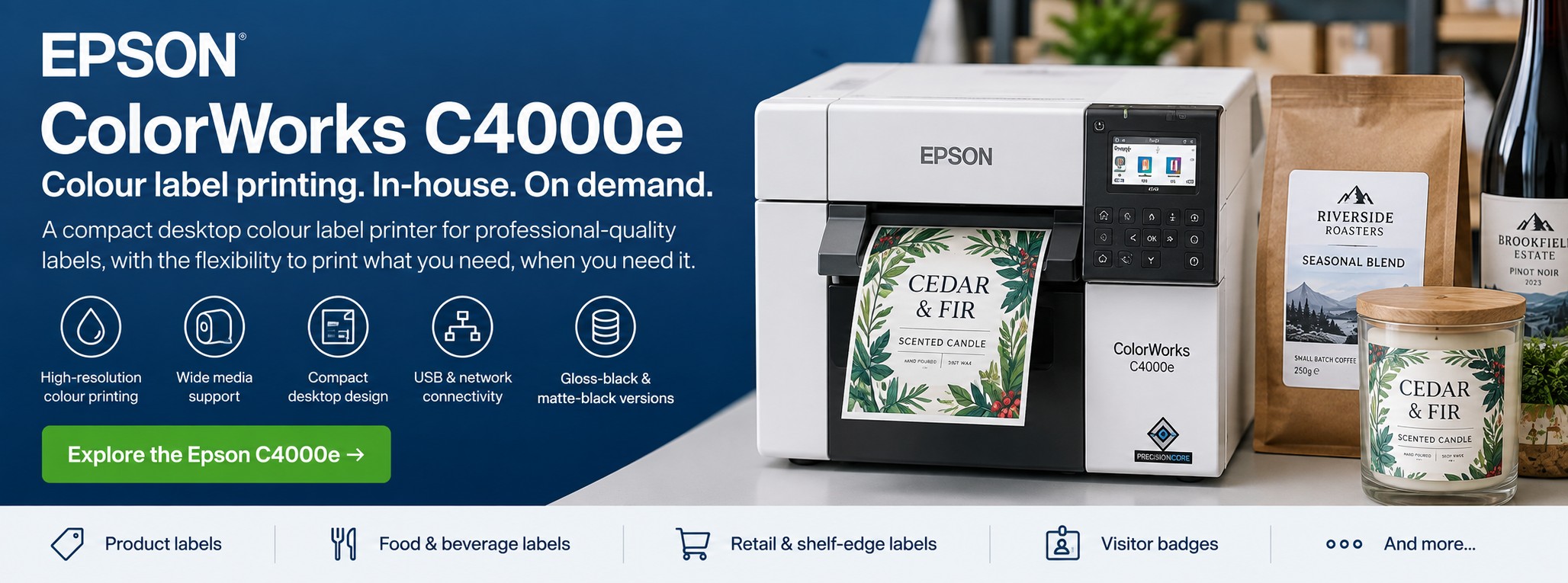
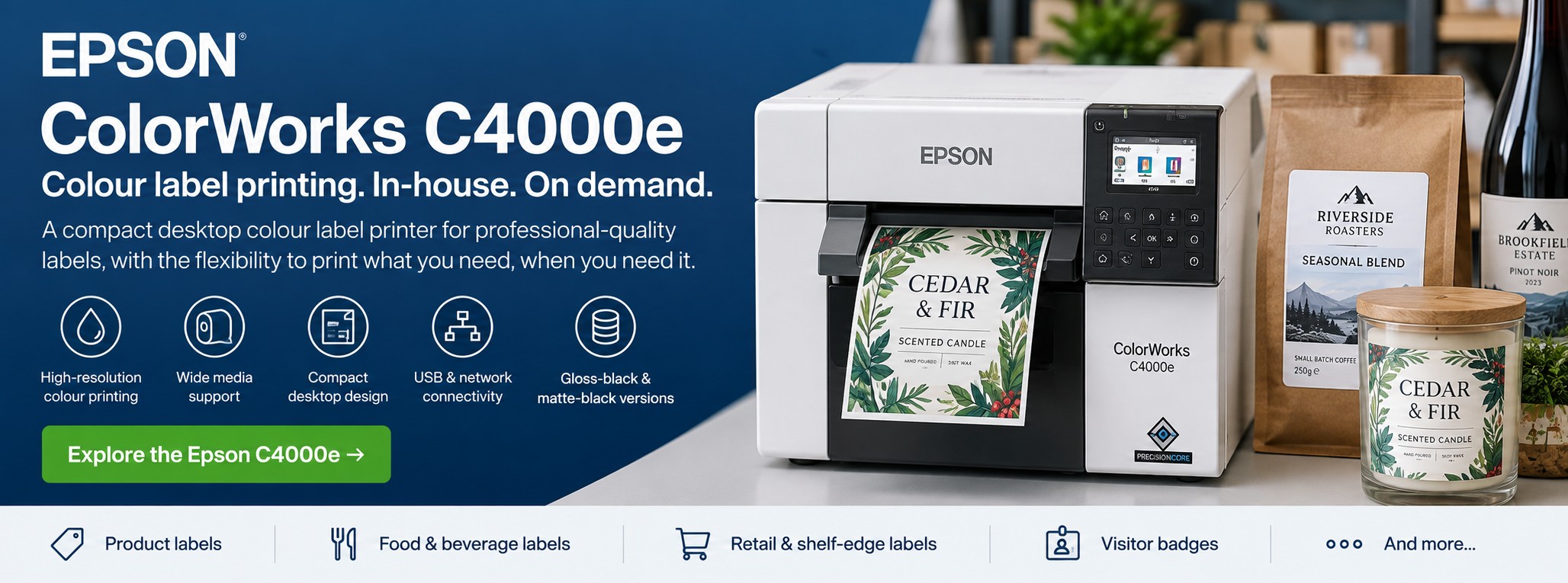
Epson ColorWorks C4000e Colour Label Printer
The Epson ColorWorks C4000e is a compact desktop colour label printer designed for businesses that want to print professional-quality labels in house, on demand.
Print product labels, food and drink labels, skincare labels, candle labels, packaging labels, shelf-edge labels and more without ordering large quantities of pre-printed stock.
Not sure whether the C4000e is right for your labels? Send us your artwork and label requirements and we can help you assess the application before you buy.
Epson ColorWorks C4000e at a Glance
Up to 1200 × 1200 dpi
High-resolution colour output for detailed product labels, graphics, text and barcodes.
Up to 108 mm Wide
Suitable for a wide variety of product and packaging label formats.
Up to 100 mm/sec
Print labels on demand without relying on externally pre-printed colour label stock.
Individual Pigment Inks
Four-colour printing with individual cartridges and a choice of matte or gloss black models.
Bring Your Label Printing In House
The C4000e gives small and medium-sized businesses an alternative to ordering batches of pre-printed colour labels.
Instead, you can print the labels you need when you need them.
Print Short Runs
Produce small quantities for new products, seasonal ranges, samples, promotions or limited editions without committing to a large print run.
Change Labels Quickly
Update ingredients, flavours, designs, product information, batch-specific details or promotional artwork and print the revised label yourself.
Reduce Pre-Printed Stock
Avoid holding multiple versions of pre-printed labels when the same printer can produce different designs on demand.
What Can You Print With the C4000e?
Food & Drink Labels
Create colourful product labels for jars, bottles, sauces, preserves, coffee, tea, bakery products and other packaged foods.
Skincare & Soap Labels
Print branded labels for soaps, creams, lotions, oils, balms and other beauty and personal-care products.
Pet Product Labels
Produce labels for pet treats, supplements, grooming products, shampoos and specialist pet products.
Candle Labels
Print branding, scent variations, product information and other colour labels for candles and home-fragrance products.
Retail & Shelf Labels
Produce colourful labels for retail products, promotions and shelf-edge applications.
Business & Specialist Labels
Use variable artwork and data for identification, packaging, samples and other short-run business applications.
See Your Own Label Printed Before You Buy
Choosing a colour label printer is much easier when you can see the actual print quality rather than relying on photographs on a website.
Tek Direkt can arrange free Epson ColorWorks print samples using your own label artwork, so you can assess colour, detail and overall appearance before deciding on a printer.
C4000e BK or MK: Which Version Do I Need?
The ColorWorks C4000e is available in two black-ink configurations. The rest of the colour set uses cyan, magenta and yellow pigment inks.
GLOSS BLACK
CW-C4000e BK
The BK version uses gloss black ink.
It is designed for applications where the media and desired finish are better suited to the gloss-black ink configuration.
Typical considerations:
- Gloss-oriented label applications
- Rich product graphics
- Retail and branded labels
- Product packaging
MATTE BLACK
CW-C4000e MK
The MK version uses matte black ink.
It is designed for media and applications better suited to Epson's matte-black ink configuration.
Typical considerations:
- Matte label media
- Strong black text
- Business labels
- Product and identification applications
Unsure whether you need BK or MK? The best choice depends on the label material and finish you're planning to use. Tell us what you're printing before ordering rather than choosing the version purely by price.
Key Epson ColorWorks C4000e Specifications
| Printer Type | Desktop colour label printer |
|---|---|
| Print Technology | Epson PrecisionCore printhead |
| Colour | Four-colour individual pigment ink cartridges |
| Maximum Resolution | Up to 1200 × 1200 dpi |
| Maximum Print Speed | Up to 100 mm/sec at 300 × 600 dpi with 102 mm print width |
| Maximum Print Width | 108 mm |
| Media | Roll and fanfold media |
| Media Types | Continuous labels, die-cut labels, continuous media, black-mark paper and black-mark labels |
| Autocutter | Included |
| Display | 2.7-inch LCD |
| Printer Languages | ESC/Label and ZPL II emulation |
| Dimensions | Approx. 310 × 285 × 283 mm |
Specifications are based on Epson's current UK product information and can vary by configuration, media and print settings.
Professional Colour Labels Without a Large Printer
One of the C4000e's biggest advantages is its relatively compact desktop format.
At approximately 310 mm wide, it can fit into environments where a larger industrial colour label printer would be unnecessary or impractical.
Small manufacturers
Print multiple product variations without holding large quantities of pre-printed stock.
Print multiple product variations without holding large quantities of pre-printed stock.
Growing brands
Bring label production in house as product ranges and volumes increase.
Bring label production in house as product ranges and volumes increase.
Farm shops & delis
Produce professional labels for own-brand products and seasonal ranges.
Produce professional labels for own-brand products and seasonal ranges.
Artisan producers
Create short runs for different flavours, fragrances, recipes or product variants.
Create short runs for different flavours, fragrances, recipes or product variants.
Retail businesses
Print product and promotional labels as requirements change.
Print product and promotional labels as requirements change.
Prototype & sample production
Produce finished-looking labels without ordering a full commercial print run.
Produce finished-looking labels without ordering a full commercial print run.
Print Quality & Colour Matching
The C4000e can print at resolutions up to 1200 × 1200 dpi, making it suitable for labels containing fine text, branding, detailed graphics and barcodes.
Epson also provides colour-matching functionality including ICC profile support and a spot-colour matching tool.
For branded products, this is particularly useful where the appearance of the finished label matters just as much as the information printed on it.
Pigment Ink for Durable Product Labels
The C4000e uses individual pigment ink cartridges rather than the dye-based ink found in some other printing technologies.
Epson describes its C4000e output as fast-drying and resistant to smudging, water and fading.
The suitability of a finished label still depends on the label material, adhesive, ink configuration and the environment in which the product will be used.
For products exposed to moisture, refrigeration, handling, oils or other challenging conditions, test the complete printer + ink + label material combination before committing to production.
Label Rolls & Media
The printer supports both roll-fed and fanfold media, including die-cut and continuous label stocks.
The right material depends on what you're labelling and the conditions the finished product will encounter.
Matte Paper
A popular option for product labels where a natural or understated finish is required.
Gloss Labels
Useful where a brighter, more polished presentation is desired.
Synthetic Media
Consider appropriate synthetic materials where greater durability or moisture resistance is required.
The C4000e supports a maximum print width of 108 mm. If your labels require a different media or production format, compare the other Epson ColorWorks models before ordering.
Epson C4000e vs C6000 vs C8000e
The C4000e isn't automatically the right ColorWorks printer for every application. Epson's C6000 Series and C8000e provide alternatives for businesses with different production volumes and workflow requirements.
| Requirement | C4000e | C6000 Series | C8000e |
|---|---|---|---|
| Best suited to | Compact on-demand colour label printing | Regular production and specialised workflows | Higher-volume colour label production |
| Maximum print speed | Up to 100 mm/sec | Up to 119 mm/sec | Up to 300 mm/sec |
| Maximum print width | 108 mm | 108 mm | 108 mm |
| Ink format | Individual ink cartridges | Individual ink cartridges | High-capacity ink pouches |
| Label handling | Integrated autocutter | Auto-cutter or peeler depending on model | Integrated autocutter |
| Short-run product labels | Excellent choice | Also suitable | Suitable, but may be more printer than required |
| Growing production volumes | Suitable for many SME applications | Strong option | Designed for more demanding throughput |
| Compact installation | Strong advantage | Larger printer | Industrial footprint |
Which ColorWorks printer should you choose? If you primarily need flexible short-run colour label printing in a compact desktop format, the C4000e is an excellent starting point. As print volumes and workflow requirements increase, consider the C6000 Series or the higher-throughput C8000e.
Why Print Labels On Demand?
Print What You Need
Produce the required quantity instead of estimating demand for a large pre-printed batch.
Reduce Obsolete Labels
If artwork or product information changes, you don't necessarily have boxes of old pre-printed labels left over.
More Product Variations
Run different flavours, fragrances, colours, sizes and seasonal designs from the same printer.
Faster Changes
Update artwork and produce revised labels without waiting for another external print run.
Personalisation
Use variable information and different artwork where your label workflow and software support it.
Prototype Quickly
Test new product designs and packaging concepts before committing to larger quantities.
Is the C4000e Right for Your Business?
The C4000e Makes Sense If...
- You want to print professional colour labels in house
- You regularly need short or changing label runs
- Your required print width fits within 108 mm
- You want high-resolution product labels
- You have multiple products or label designs
- You want to reduce reliance on pre-printed label stock
Consider Another ColorWorks Model If...
- Your production requirements are significantly higher
- Your application needs a different media-handling arrangement
- You need a peeler configuration for your workflow
- Your colour label production has become a higher-volume everyday requirement
In those cases, compare the C4000e with the Epson ColorWorks C6000 Series for more demanding or specialised workflows, or the Epson ColorWorks C8000e for higher-volume colour label production.
Choosing a ColorWorks Printer for Your Print Volume
Print volume is one of the most useful starting points when comparing Epson ColorWorks printers, but it shouldn't be considered in isolation.
Label dimensions, media, required finish, production speed and how the printer will fit into your workflow are also important.
COMPACT DESKTOP
C4000e
A strong starting point for businesses producing professional colour labels in shorter runs or changing designs regularly.
Particularly attractive where desktop space matters and the production requirements don't justify a larger printer.
MORE WORKFLOW OPTIONS
C6000 Series
Worth considering as production requirements increase or where the choice between an auto-cutter and peeler is useful.
HIGHER THROUGHPUT
C8000e
Designed for more demanding colour label production where higher print speeds and a high-capacity ink system become important.
Not sure which level you need? Send us your label dimensions and approximate daily or monthly quantity. We'll help you compare the options rather than simply recommending the largest printer.
Explore Colour Label Printing Applications
Different products place different demands on the label material, finish and printing process. Explore our application guides for more specific advice.
Coffee Labels
Explore in-house printing for single origins, seasonal blends, micro-lots and frequently changing coffee ranges.
Jarred Food Labels
Print colourful labels for jams, preserves, chutneys, sauces and other jarred products.
Candle Labels
Produce different designs for fragrances, seasonal ranges and limited-edition candle products.
Skincare & Soap
Explore flexible colour label production for soaps, creams, oils, balms and other personal-care products.
Pet Products
Produce labels for pet treats, supplements, grooming products and other specialist pet ranges.
Food & Drink
Explore colour label printing for packaged foods, beverages and changing product ranges.
Frequently Asked Questions
What is the maximum label width for the Epson C4000e?
The C4000e has a maximum printable width of 108 mm. The physical media dimensions and printable area are not necessarily the same thing, so check your exact label dimensions before ordering.
What resolution does the C4000e print at?
The printer supports resolutions up to 1200 × 1200 dpi, depending on the selected print settings.
How fast is the Epson C4000e?
Epson specifies a maximum speed of 100 mm per second at 300 × 600 dpi with a 102 mm print width.
What is the difference between C4000e BK and MK?
The BK version uses gloss black ink, while the MK version uses matte black ink. The appropriate version depends primarily on the media and finish required for your labels.
Does the C4000e have a cutter?
Yes. Epson supplies the C4000e with an autocutter. Epson also states that the cutter can be replaced without requiring an engineer visit.
Can the C4000e print waterproof labels?
The printer uses durable pigment inks, but whether the finished label is suitable for exposure to water depends on the complete combination of ink, label material, adhesive and application.
Test the intended media for your real-world environment before committing to production.
Is the C4000e suitable for short-run product labels?
Yes. Short-run and frequently changing product labels are one of the applications where on-demand colour printing can be particularly useful.
Instead of purchasing a separate batch of pre-printed labels for every product variation, different artwork can be produced from the same printer as required.
When should I consider the Epson C6000 instead?
The C6000 Series is worth considering where production requirements are more demanding or where your workflow benefits from the choice between auto-cutter and peeler configurations.
When should I consider the Epson C8000e?
The C8000e is designed for higher-volume colour label production and offers print speeds of up to 300 mm per second together with a high-capacity ink-pouch system.
If colour label printing has become a regular high-throughput part of your production process, it is worth comparing the C8000e with the smaller ColorWorks models.
Can I see the print quality before buying?
Yes. Tek Direkt can arrange free Epson ColorWorks print samples using your own artwork so you can assess the result before deciding on a printer.
Can I print different label designs from the same printer?
Yes. One of the main benefits of on-demand digital colour label printing is the ability to switch between different label artwork without purchasing a separate batch of pre-printed colour labels for every design.
Not Sure Which ColorWorks Printer You Need?
Choosing between the C4000e, C6000 Series and C8000e involves more than comparing printer specifications.
Your label dimensions, material, finish, production volume and workflow all affect which printer is likely to be the most appropriate.
Send us:
Label dimensions
Tell us the width and height of the label you need to produce.
Tell us the width and height of the label you need to produce.
Approximate quantity
Let us know roughly how many labels you expect to print each day or month.
Let us know roughly how many labels you expect to print each day or month.
Material & finish
Tell us whether you're considering matte, gloss, synthetic or another label material.
Tell us whether you're considering matte, gloss, synthetic or another label material.
Your artwork
Send us an example of the label you're currently using or planning to produce.
Send us an example of the label you're currently using or planning to produce.
We can help you narrow down the ColorWorks options and arrange free Epson print samples using your own artwork before you commit to a printer.
Buying the Epson ColorWorks C4000e
Tek Direkt supplies Epson ColorWorks printers, inks, label media and business printing hardware to UK organisations.
If you already know which C4000e configuration you require, send us the manufacturer part number and quantity and we'll provide a business price.
Already have a supplier quotation? Send us the exact Epson MPN and quantity and we'll provide another price for comparison.
If you're not yet sure which printer is appropriate, send us your label dimensions, material, approximate print volume and artwork instead.
See What the Epson C4000e Can Do With Your Labels
Before investing in a colour label printer, see how your own artwork looks when printed.
Send us your label artwork and tell us what you're labelling. We can arrange free Epson ColorWorks print samples to help you assess the quality and compare the C4000e with the C6000 and C8000e.
FREE LABEL WASTE CALCULATOR
How Many Labels Could Your Business Be Wasting?
Unused pre-printed labels, outdated designs and changing product information can all lead to unnecessary waste.
Our free Label Waste Savings Calculator helps you estimate how many labels could be wasted each year and explore the potential benefits of switching to on-demand colour label printing.
Estimate annual label waste Calculate wasted label material Explore potential reductions
Calculate Your Label Waste →
Free to use. Results are estimates based on the figures you enter.