
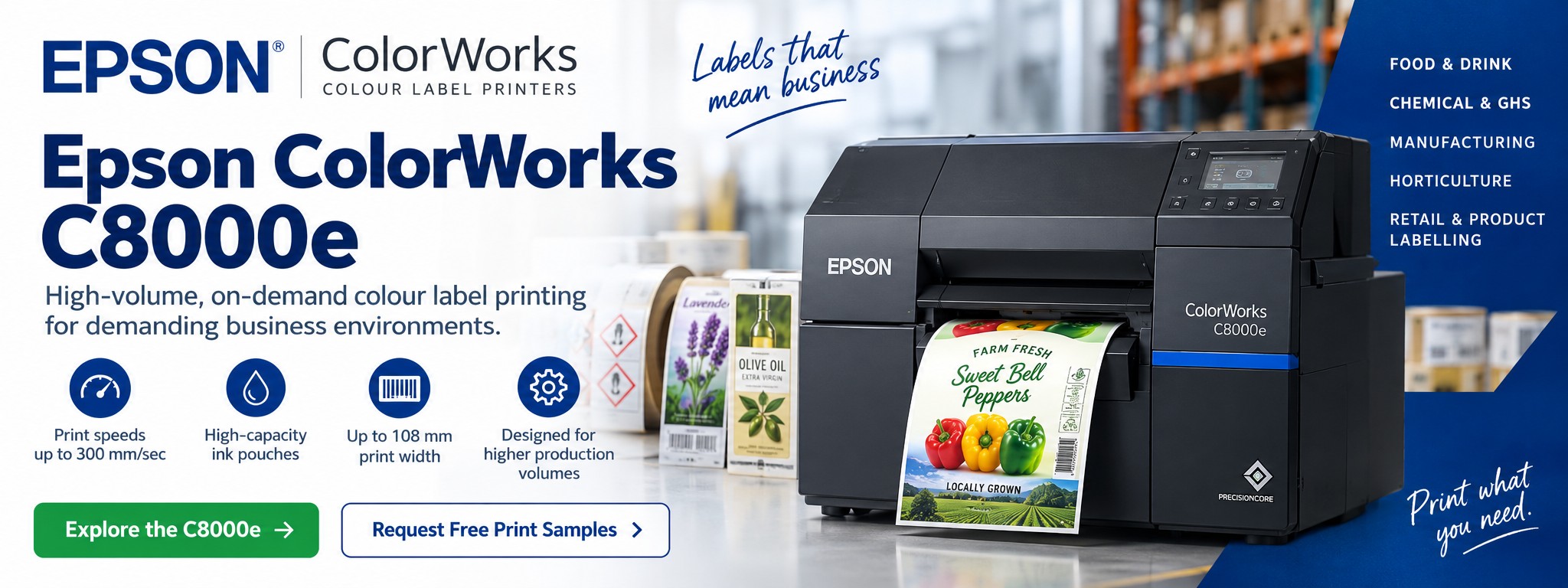
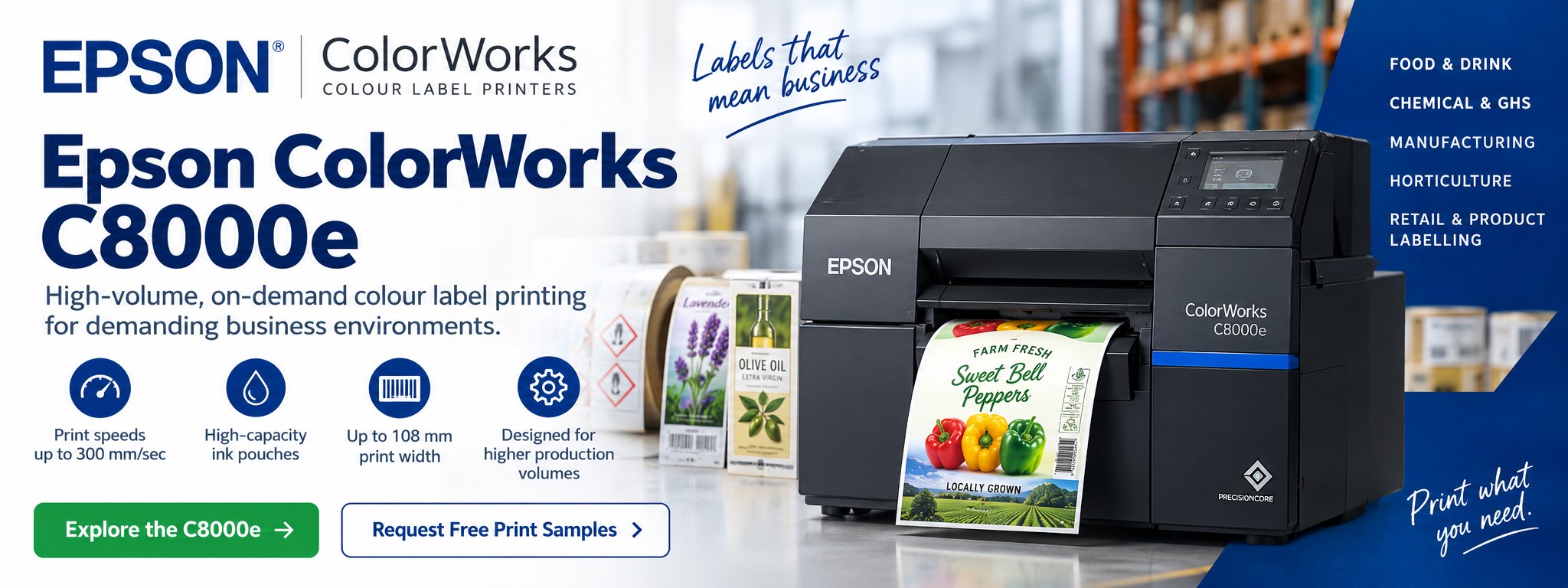
Epson ColorWorks C8000e Colour Label Printer
The Epson ColorWorks C8000e is a high-performance industrial colour label printer designed for businesses that need fast, reliable and professional full-colour label production in house.
With print speeds of up to 300 mm/sec, high-capacity ink pouches and a maximum print width of 108 mm, the C8000e is built for more demanding production environments where colour labels are required regularly and at higher volumes.
Tek Direkt currently supplies the Epson ColorWorks C8000e BK – C31CL02102BK. If you require another C8000e configuration, send us the complete Epson MPN and quantity.
Not sure whether the C8000e is right for your production volumes? Send us your artwork, label dimensions, media requirements and approximate monthly quantity and we can help you compare the ColorWorks options before you buy.
Epson ColorWorks C8000e at a Glance
Up to 300 mm/sec
High-speed colour label production for businesses with more demanding print volumes and production workflows.
Up to 108 mm Wide
Produce a wide variety of product, packaging, manufacturing and specialist labels.
High-Capacity Ink Pouches
Designed around regular production use rather than the smaller cartridges used by compact desktop models.
Industrial ColorWorks Platform
Built for organisations that need dependable on-demand colour label printing as part of everyday production.
Bring High-Volume Colour Label Printing In House
The C8000e gives businesses an alternative to relying entirely on externally pre-printed colour label stock when label requirements change regularly or production volumes justify bringing more of the process in house.
Instead, complete colour labels can be produced when they're required.
Print at Production Speed
With print speeds of up to 300 mm/sec, the C8000e is designed for substantially higher-throughput colour label production than smaller desktop ColorWorks models.
Change Labels Quickly
Update product information, artwork, ingredients, batch details, warnings or branding without waiting for another externally printed batch.
Reduce Pre-Printed Stock
Produce multiple label designs from the same printer instead of holding large inventories of pre-printed labels for every product or SKU.
What Can You Print With the C8000e?
Food & Beverage Labels
Produce full-colour labels for packaged foods, beverages, jars, bottles, coffee, ingredients and changing product ranges.
Chemical & GHS Labels
Produce colour labels incorporating product identification, hazard information, pictograms and other required information using suitable compatible media.
Manufacturing Labels
Print product identification, packaging, warning, batch and production labels within manufacturing workflows.
Plant & Horticultural Labels
Produce colour identification labels and tags for horticultural applications using suitable media for the intended environment.
Product & Packaging Labels
Combine branding, graphics, barcodes, variable information and product details within a single colour label.
Logistics & Identification
Use colour where visual identification, warnings, product information or workflow coding adds value beyond conventional monochrome labels.
See Your Own Label Printed Before You Buy
A ColorWorks C8000e is a significant investment. Seeing your own artwork printed is much more useful than judging print quality from photographs on a website.
Tek Direkt can arrange free Epson ColorWorks print samples using your own label artwork, helping you assess colour, detail and overall appearance before choosing a printer.
Tell us your label dimensions, intended material, approximate print volume and what the label will be used for. This also helps determine whether the C8000e, C6000 or C4000e is the more appropriate option.
C8000e BK or MK: Which Version Do I Need?
The Epson ColorWorks C8000e is available with different black-ink configurations. Choosing the appropriate version depends primarily on the label material and finish you intend to use.
GLOSS BLACK
ColorWorks C8000e BK
The BK version uses gloss black ink.
Tek Direkt currently lists the C8000e BK – C31CL02102BK.
Typical considerations:
- Gloss-oriented label applications
- Product and packaging labels
- Branded colour labels
- Compatible gloss media
MPN: C31CL02102BK
MATTE BLACK
ColorWorks C8000e MK
The MK version uses matte black ink.
It provides an alternative for applications and compatible media better suited to Epson's matte-black ink configuration.
Typical considerations:
- Matte label materials
- Strong black text and information
- Industrial and identification labels
- Compatible matte media
MPN: C31CL02102MK
Unsure whether you need BK or MK?
Don't choose purely on printer price. The correct version depends on your label material, finish and application. Send us details of the media you're planning to use and we can help you narrow down the appropriate configuration.
Key Epson ColorWorks C8000e Specifications
| Printer Type | Industrial colour label printer |
|---|---|
| Print Technology | Epson PrecisionCore linehead inkjet technology |
| Colour | Four-colour pigment ink system |
| Maximum Print Speed | Up to 300 mm/sec at 600 × 1200 dpi |
| Maximum Print Width | 108 mm |
| Supported Media Width | 25 mm to 112 mm |
| Media Types | Continuous media, die-cut labels and compatible black-mark media |
| Ink System | High-capacity individual ink pouches |
| Black Ink Options | Gloss black (BK) or matte black (MK), depending on configuration |
| Autocutter | Integrated |
| Printer Languages | ESC/Label and ZPL II emulation |
| Maximum Roll Diameter | Up to approximately 8 inches |
| Dimensions | Approx. 620 × 392 × 420 mm |
| Weight | Approx. 35 kg |
Specifications are based on Epson's current product information and can vary according to configuration, media and print settings. Always check the complete Epson MPN and application requirements before ordering.
Built for More Demanding Colour Label Production
The C8000e sits at a different point in the ColorWorks range from compact desktop models such as the C4000e.
Its higher print speed, larger physical platform and high-capacity ink system make it particularly relevant where colour label printing forms a regular part of production rather than an occasional requirement.
Food manufacturers
Produce multiple product, ingredient, batch and branded label designs without relying entirely on externally pre-printed stock.
Produce multiple product, ingredient, batch and branded label designs without relying entirely on externally pre-printed stock.
Chemical manufacturers
Produce colour labels incorporating product identification, pictograms and other information using appropriate compatible media.
Produce colour labels incorporating product identification, pictograms and other information using appropriate compatible media.
Manufacturing businesses
Bring colour product, packaging, warning and identification labels closer to the production process.
Bring colour product, packaging, warning and identification labels closer to the production process.
Growing brands
Support larger product ranges and higher label volumes while retaining the flexibility of digital on-demand printing.
Support larger product ranges and higher label volumes while retaining the flexibility of digital on-demand printing.
Contract packers
Switch between different customer artwork, products and label designs without maintaining pre-printed stock for every variation.
Switch between different customer artwork, products and label designs without maintaining pre-printed stock for every variation.
Horticultural businesses
Produce colour identification labels and tags using media selected for the intended application and environment.
Produce colour identification labels and tags using media selected for the intended application and environment.
Fast, Professional Full-Colour Label Printing
The C8000e is designed to combine the flexibility of digital colour label printing with the throughput required for more demanding production environments.
Its PrecisionCore linehead enables printing at speeds of up to 300 mm per second, allowing labels containing text, barcodes, graphics, branding and colour-coded information to be produced within a single printing process.
This can be particularly valuable when the same production environment handles numerous products or SKUs and label artwork changes regularly.
Speed isn't the only consideration.
The appropriate printer should be selected according to your required label dimensions, media, print volume, finished-label durability and workflow. For lower volumes, a C4000e or C6000 may provide a more economical solution.
High-Capacity Pigment Ink Pouches
Unlike the smaller cartridges used by compact desktop ColorWorks printers, the C8000e uses a high-capacity ink-pouch system designed around more intensive colour label production.
The printer uses cyan, magenta and yellow alongside either gloss black or matte black, depending on the selected C8000e configuration.
Individual colours can be replaced separately rather than replacing an entire multi-colour cartridge when one colour is depleted.
Tek Direkt also supplies replacement inks for the C8000e.
Label Rolls & Media for the C8000e
Choosing the correct label material is just as important as choosing the printer.
The appropriate media depends on the product being labelled, required finish, application method and the conditions the finished label will encounter.
Matte Paper
Suitable for many product, packaging and identification applications where a non-gloss appearance is preferred.
Gloss Labels
Useful for branded product labels and applications where a brighter, polished presentation is required.
Synthetic Media
Consider appropriate compatible synthetic materials where greater resistance to moisture, handling or demanding environments is required.
The C8000e supports a maximum printable width of 108 mm and media widths up to approximately 112 mm.
For applications involving moisture, chemicals, refrigeration, oils, outdoor exposure or heavy handling, test the complete printer + ink + label material + adhesive combination for the real-world application rather than assuming the printer alone determines label durability.
Epson C4000e vs C6000 vs C8000e
The C8000e isn't automatically the best ColorWorks printer simply because it is the highest-production model of these three.
The right choice depends on how many labels you print, how quickly you need to produce them, your label media and how colour label printing fits into your production workflow.
| Requirement | C4000e | C6000 Series | C8000e |
|---|---|---|---|
| Best suited to | Compact on-demand colour label printing | Regular production and specialised workflows | Higher-volume colour label production |
| Maximum print speed | Up to 100 mm/sec | Up to 119 mm/sec | Up to 300 mm/sec |
| Maximum print width | 108 mm | 108 mm | 108 mm |
| Ink format | Individual ink cartridges | Individual ink cartridges | High-capacity ink pouches |
| Label handling | Integrated autocutter | Auto-cutter or peeler depending on model | Integrated autocutter |
| Compact installation | Strong advantage | Larger production printer | Industrial footprint |
| Short runs & changing designs | Excellent choice | Excellent choice | Suitable, but may be more printer than required |
| Higher production volumes | Suitable for many smaller applications | Strong option for regular production | Designed for more demanding throughput |
When Is It Worth Moving Up to the C8000e?
Businesses don't necessarily need to start with the largest ColorWorks printer.
The C8000e becomes particularly interesting when label production has developed from an occasional requirement into a regular part of the production process.
Your Volumes Have Increased
If colour labels are being produced throughout the working day, the C8000e's higher print speed and larger ink system may be better suited to the workload.
You Have More SKUs
Growing product ranges can create increasing numbers of label designs. On-demand printing allows artwork to change without maintaining a separate stock of pre-printed labels for every SKU.
Labels Are Part of Production
Where colour labels need to be available as part of manufacturing, packing or dispatch rather than produced occasionally, a higher-throughput platform becomes more valuable.
Not sure whether your volumes justify a C8000e?
Tell us your label dimensions and approximate number of labels printed per day or month. We can help you compare the C4000e, C6000 and C8000e rather than automatically recommending the most expensive printer.
Colour Label Printing for Chemical & GHS Applications
Chemical and industrial labels can require colour alongside text, barcodes, product information and hazard pictograms.
The C8000e can form part of a colour label printing system for chemical applications where the selected printer configuration, ink, label material and adhesive are appropriate for the required environment and regulatory requirements.
Hazard pictograms
Produce labels containing colour-coded warning and hazard information.
Produce labels containing colour-coded warning and hazard information.
Product identification
Combine product names, branding, barcodes and variable information within the same label.
Combine product names, branding, barcodes and variable information within the same label.
Changing formulations
Update label artwork and information without ordering another complete batch of externally pre-printed labels.
Update label artwork and information without ordering another complete batch of externally pre-printed labels.
Multiple products
Use the same printing platform for different products and label designs where the media and application are compatible.
Use the same printing platform for different products and label designs where the media and application are compatible.
Always establish the applicable regulatory, durability and media requirements for your specific chemical labelling application before selecting a printer and label stock.
Epson C8000e for Manufacturing
Manufacturing businesses don't always need colour on every label. For conventional monochrome barcode and identification labels, a thermal printer may remain the better option.
The C8000e becomes more relevant where colour itself adds useful information or where product presentation matters.
Product Identification
Combine product information, branding, barcodes and graphics within a single printed label.
Warning & Visual Information
Use colour to make particular information, warnings or workflow identifiers more visually distinctive.
Packaging & Finished Goods
Produce professional branded labels closer to the point of manufacture, packing or dispatch.
For applications where colour isn't required, explore our Label Printers for Manufacturing for thermal and other label-printing options.
Why Print Colour Labels On Demand?
Print What You Need
Produce labels according to actual production requirements instead of estimating future demand for a large pre-printed batch.
Reduce Obsolete Labels
When product information or artwork changes, you're less likely to be left with large quantities of unusable pre-printed stock.
Manage More SKUs
Produce different label designs for multiple products, pack sizes, formulations or customers using the same printing platform.
Make Changes Faster
Update artwork and produce revised labels without waiting for another external print run.
Print Variable Information
Incorporate changing information where your label-design software and business workflow support it.
Bring Printing Closer to Production
Produce colour labels closer to the point where products are manufactured, packed or dispatched.
Do You Actually Need a Colour Label Printer?
Not every business label needs to be printed on an Epson ColorWorks printer.
If your requirement is primarily for high-volume monochrome shipping, warehouse, barcode or identification labels, a conventional direct-thermal or thermal-transfer printer may be the more appropriate and economical choice.
The C8000e makes more sense when colour is an important part of the finished label — for example branding, product imagery, colour coding, warnings, pictograms or other visual information.
Consider the C8000e If...
- You need professional full-colour labels
- Your colour label volumes are relatively high
- You manage multiple products or label designs
- Labels change regularly
- You want to reduce reliance on pre-printed colour stock
- Label printing forms part of your production workflow
Consider a Thermal Printer If...
- Your labels are primarily monochrome
- You mainly print shipping or logistics labels
- Colour doesn't add meaningful value to the label
- Your application requires a specialist thermal-transfer media/ribbon combination
- Your priority is straightforward barcode and identification printing
Read our Thermal Transfer vs Direct Thermal Label Printers guide for more information.
Is the Epson C8000e Right for Your Business?
The C8000e Makes Sense If...
- You need higher-volume professional colour label production
- You want print speeds substantially above the C4000e and C6000
- Your required print width fits within 108 mm
- You regularly produce multiple label designs
- You want a high-capacity ink system
- You want to reduce reliance on externally pre-printed colour labels
- Colour label printing is an important part of your everyday operation
Consider Another ColorWorks Model If...
- Your colour label volumes are relatively low
- You need a smaller desktop footprint
- You need a peeler configuration
- Your workflow is better suited to the C6000 Series
- Your application doesn't justify the C8000e's higher production capability
In those cases, compare the C8000e with the C4000e and C6000 Series before purchasing.
Explore Colour Label Printing Applications
The right ColorWorks printer depends on what you're labelling, the media being used, the required finish and how many labels you expect to produce.
Food & Drink Labels
Explore in-house colour label printing for packaged food, drinks and frequently changing product ranges.
Coffee Labels
Print labels for single origins, seasonal blends, micro-lots and frequently changing coffee ranges.
Jarred Food Labels
Produce colour labels for jams, preserves, chutneys, sauces and other jarred products.
Candle Labels
Explore flexible in-house printing for different fragrances, seasonal ranges and limited-edition candle products.
GHS Chemical Labels
Learn about colour label printing for chemical products, hazard information and GHS-related applications.
Waterproof Plant Labels
Explore printers and compatible media for horticultural and plant identification applications.
Frequently Asked Questions
How fast is the Epson ColorWorks C8000e?
Epson specifies print speeds of up to 300 mm per second at 600 × 1200 dpi. Actual throughput will depend on the label design, media, print settings and workflow.
What is the maximum print width of the C8000e?
The C8000e has a maximum printable width of 108 mm and supports media widths up to approximately 112 mm. The physical media width and printable area are not necessarily the same, so check your actual label dimensions before ordering.
What is the difference between the C8000e BK and MK?
The C8000e BK uses gloss black ink, while the C8000e MK uses matte black ink. The appropriate version depends on the compatible label material, required finish and application.
What is the MPN for the Epson C8000e BK?
The Epson ColorWorks C8000e BK currently listed by Tek Direkt is C31CL02102BK. Always compare the complete manufacturer part number when checking supplier quotations.
Does the Epson C8000e have an autocutter?
Yes. The C8000e includes an integrated autocutter for applications where printed labels or sections of continuous media need to be separated after printing.
Does the C8000e use cartridges?
The C8000e uses high-capacity individual ink pouches rather than the smaller individual cartridges used by models such as the C4000e.
Should I buy the C4000e, C6000 or C8000e?
The C4000e is particularly attractive for compact, lower-volume on-demand colour label printing. The C6000 Series provides greater production and workflow flexibility, including auto-cutter and peeler configurations. The C8000e is designed for more demanding production requirements where higher print speeds and a high-capacity ink system are valuable.
Your actual print volume, label dimensions, media and workflow should determine the choice rather than simply selecting the largest printer.
Can the C8000e print GHS chemical labels?
The C8000e can form part of a colour label printing solution for chemical and GHS-related applications where the printer configuration, ink, label material and adhesive meet the requirements of the intended application.
Always confirm the applicable regulatory and durability requirements for your particular labels.
Can the C8000e print waterproof labels?
The durability of the finished label depends on the complete combination of printer ink, label material, adhesive and the environment in which the label will be used.
For exposure to water, chemicals, refrigeration, oils, outdoor conditions or heavy handling, test the intended media for the real-world application before committing to production.
Can I see the print quality before buying a C8000e?
Yes. Tek Direkt can arrange free Epson ColorWorks print samples using your own artwork so you can assess colour, detail and overall appearance before deciding which printer is appropriate.
Epson C8000e Inks & Ongoing Supplies
Printer cost is only one part of choosing a colour label printing system. Ink usage, label media and expected print volume should also be considered when comparing models.
The C8000e uses high-capacity individual ink pouches, allowing each colour to be replaced separately as required.
Tek Direkt supplies replacement Epson ColorWorks C8000e inks alongside the printer.
Try Your Own Label Artwork Before Choosing a Printer
If you're considering investing in an Epson ColorWorks printer, send us the artwork you're currently using or planning to print.
Tek Direkt can arrange free Epson ColorWorks print samples using your own artwork, giving you an opportunity to assess the finished result before committing to a printer.
Include your label dimensions, preferred material or finish and approximate monthly print volume. That information can also help determine whether the C4000e, C6000 or C8000e is the more appropriate model for your application.
Buying the Epson ColorWorks C8000e
Tek Direkt supplies Epson ColorWorks printers, inks, label media and business printing hardware to UK organisations.
Tek Direkt currently lists the Epson ColorWorks C8000e BK – C31CL02102BK.
If you already know this is the configuration you require, send us the MPN and quantity for a business quote.
Already have a supplier quotation? Send us the exact Epson part number and quantity and we'll provide another price for comparison.
If you're not yet sure which ColorWorks model is appropriate, send us your label dimensions, material, approximate print volume and artwork instead.
See What the Epson C8000e Can Do With Your Labels
Before investing in a high-production colour label printer, see how your own artwork looks when printed.
Send us your label artwork together with the dimensions, material and approximate print volume. We can arrange free Epson ColorWorks print samples and help you compare the C4000e, C6000 and C8000e.