
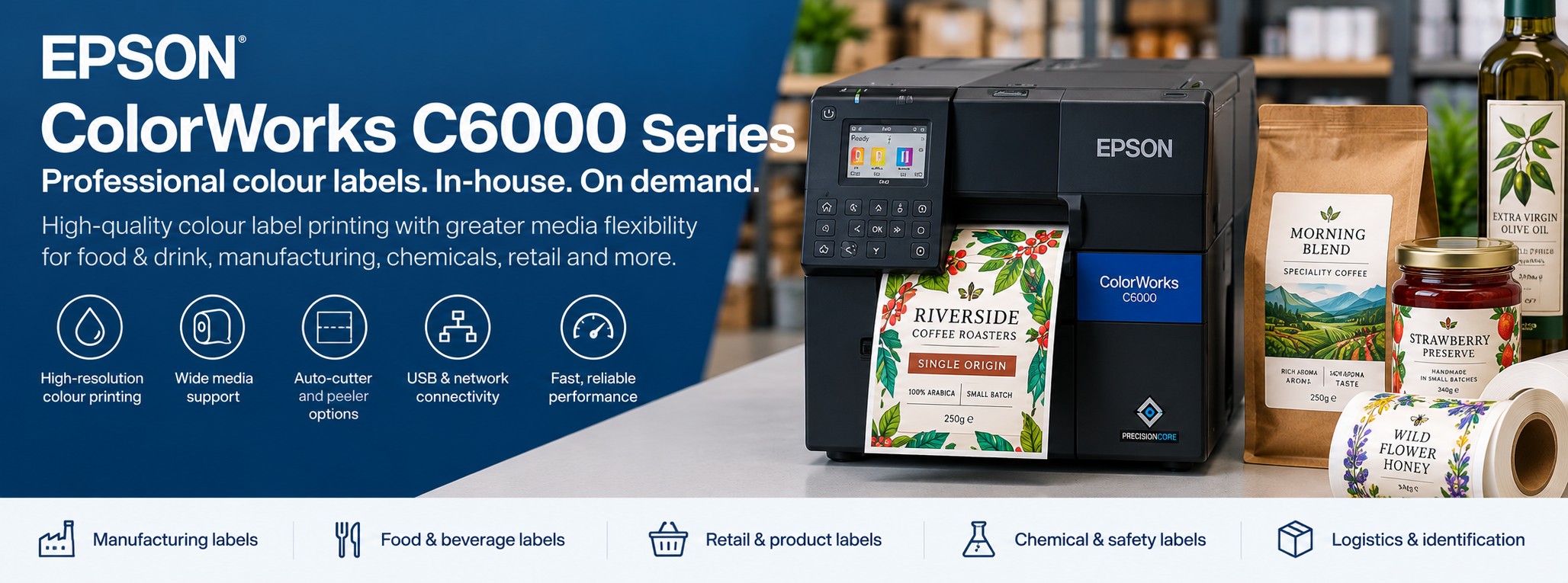
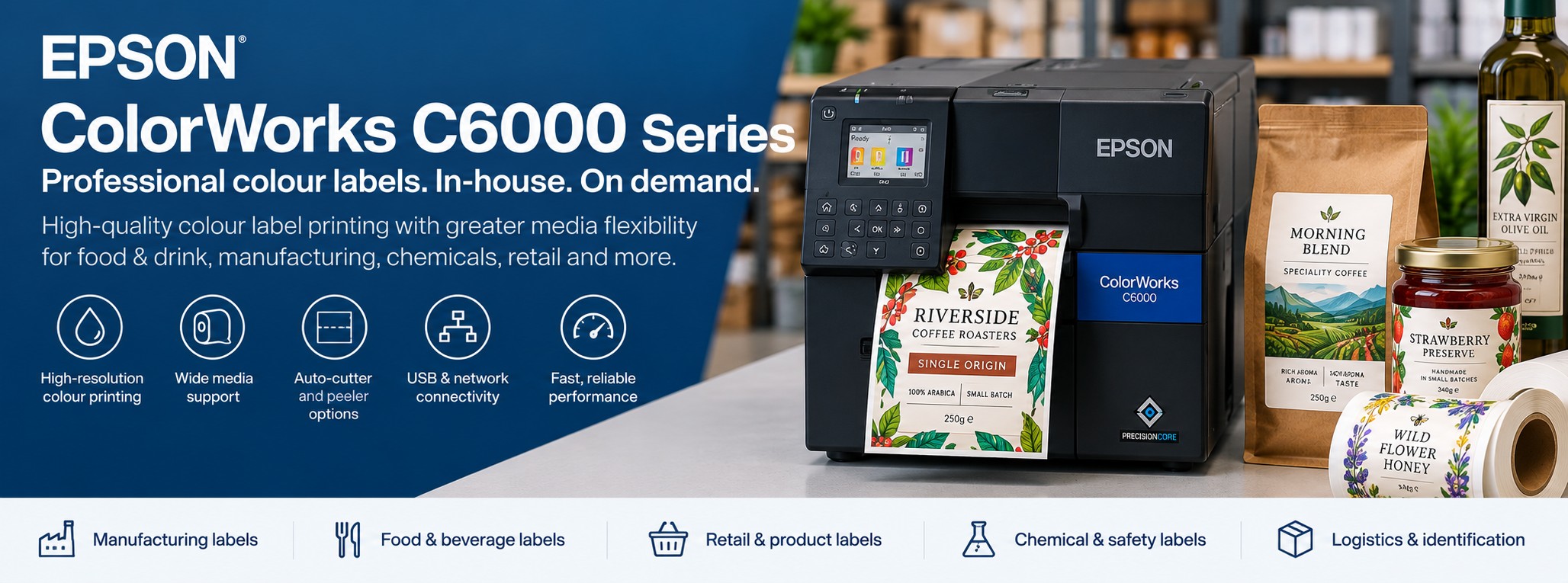
Epson ColorWorks C6000 Series Colour Label Printer
The Epson ColorWorks C6000 Series is a professional on-demand colour label printing range for businesses that need greater production and workflow flexibility than a compact desktop colour label printer.
Choose between the C6000Ae with integrated auto-cutter and the C6000Pe with built-in peeler, with gloss-black and matte-black ink configurations available for different label media and applications.
Already know the Epson MPN you need? Send us the part number and quantity for a business price.
Epson ColorWorks C6000 at a Glance
1200 × 1200 dpi
High-resolution full-colour output for detailed labels, graphics, text and barcodes.
Up to 119 mm/sec
Designed for regular small and medium-batch professional label production.
Up to 108 mm Print Width
Supports media up to 112 mm wide for a broad range of label formats.
Ae or Pe
Choose an integrated auto-cutter or built-in peeler to suit your label workflow.
Which Epson C6000 Do I Need?
There are two decisions to make before ordering: auto-cutter or peeler, followed by gloss black or matte black ink.
AUTO-CUTTER
Epson C6000Ae
The C6000Ae includes an integrated auto-cutter that can automatically cut printed media after a label or batch has been produced.
Consider the C6000Ae for:
- Product labels
- Food and drink labels
- Packaging labels
- Chemical labels
- Horticultural labels
- Logistics labels
- Batch label production
The C6000Ae supports media widths from approximately 25 mm to 112 mm.
PEELER
Epson C6000Pe
The C6000Pe incorporates a built-in peeler. Labels are separated from their backing after printing, ready for application.
Consider the C6000Pe for:
- Production-line labelling
- Repeated manual label application
- Packaging operations
- Manufacturing
- Product identification
- Print-and-apply workflows
The C6000Pe supports media widths from approximately 50 mm to 112 mm.
Simple choice:
if you want labels or batches automatically cut, look at the C6000Ae. If operators need each label presented ready to remove and apply, look at the C6000Pe.
C6000Ae vs C6000Pe
| Feature | C6000Ae | C6000Pe |
|---|---|---|
| Label Handling | Integrated auto-cutter | Built-in peeler |
| Minimum Media Width | Approx. 25 mm | Approx. 50 mm |
| Maximum Media Width | 112 mm | 112 mm |
| Maximum Print Width | 108 mm | 108 mm |
| Typical Workflow | Print and cut labels or batches | Print, peel and apply labels |
| Typical Applications | Food, beverage, product, chemical, horticulture and logistics labels | Production, manufacturing, packaging and repetitive label application |
Gloss Black or Matte Black?
Both C6000Ae and C6000Pe models are available with different black-ink configurations.
BK
Gloss Black
The BK configuration uses Epson's gloss-black ink and is intended for compatible label materials and applications where that ink formulation provides the required result.
Common considerations include:
- Gloss-oriented label materials
- Branded product labels
- Packaging labels
- Colour-rich product artwork
MK
Matte Black
The MK configuration uses matte-black ink and provides greater flexibility for compatible matte, plain and textured label materials.
Common considerations include:
- Matte label stocks
- Plain paper
- Compatible textured media
- Applications requiring a matte-black finish
Don't choose BK or MK purely on printer price.
Start with the label material you intend to use. If you're unsure, send us the application and artwork so the media and printer configuration can be considered together.
Epson C6000 Models & Part Numbers
When comparing prices, use the complete Epson manufacturer part number rather than simply asking for a "C6000".
| MPN | Model | Handling | Black Ink |
|---|---|---|---|
| C31CH76102BK | C6000Ae BK | Auto-cutter | Gloss black |
| C31CH76102MK | C6000Ae MK | Auto-cutter | Matte black |
| C31CH76202BK | C6000Pe BK | Peeler | Gloss black |
| C31CH76202MK | C6000Pe MK | Peeler | Matte black |
Availability can vary by configuration. Check the exact MPN and current product listing before ordering.
See Your Own Label Printed Before You Buy
A specification sheet won't tell you exactly how your branding, colours and label design will look when printed.
Tek Direkt can arrange free Epson ColorWorks print samples using your own artwork.
Send us your artwork, approximate label dimensions, expected print volume and tell us what the label will be used for. You can see the output before deciding which ColorWorks printer and media are right for the application.
What Can You Print With the Epson C6000?
Food & Drink Labels
Print professional labels for jars, bottles, sauces, preserves, coffee, tea and packaged food products.
Product & Packaging Labels
Create full-colour branding, product information, graphics and barcodes in a single on-demand print process.
Manufacturing Labels
Combine identification, colour coding, text, graphics and barcode information for suitable manufacturing applications.
Chemical & GHS Labels
Produce colour labels for suitable chemical and industrial applications using media selected for the required environment.
Plant & Horticultural Labels
Produce changing plant identification, product information, barcodes, photography and branding using suitable media.
Logistics & Identification
Add colour, identification and barcode information to appropriate warehouse, logistics and business workflows.
Why Bring Colour Label Printing In House?
Multiple SKUs
Switch between products and label artwork without stocking a large pre-printed quantity of every design.
Switch between products and label artwork without stocking a large pre-printed quantity of every design.
Short & medium runs
Produce quantities that more closely match current production requirements.
Produce quantities that more closely match current production requirements.
Changing artwork
Update product designs without necessarily writing off large stocks of obsolete pre-printed labels.
Update product designs without necessarily writing off large stocks of obsolete pre-printed labels.
Seasonal products
Create temporary or limited-edition label designs internally.
Create temporary or limited-edition label designs internally.
Variable information
Incorporate changing data where supported by your label software and workflow.
Incorporate changing data where supported by your label software and workflow.
Faster turnaround
Produce approved labels internally rather than waiting for another external print run.
Produce approved labels internally rather than waiting for another external print run.
Professional Full-Colour Output
The ColorWorks C6000 Series uses Epson PrecisionCore printhead technology and offers print resolutions up to 1200 × 1200 dpi.
This allows colour graphics, branding, fine text and barcodes to be combined on the same label.
Epson also provides colour-matching functionality including ICC profile support and a spot-colour matching tool, which can be particularly useful for branded product-label applications.
Key Epson ColorWorks C6000 Specifications
| Printer Category | Industrial colour label printer |
|---|---|
| Print Technology | Epson PrecisionCore |
| Colour Printing | Four-colour |
| Maximum Resolution | 1200 × 1200 dpi |
| Maximum Print Speed | 119 mm/sec at 300 × 600 dpi and 108 mm print width |
| Maximum Print Width | 108 mm |
| Maximum Media Width | 112 mm |
| C6000Ae Media Width | Approx. 25–112 mm |
| C6000Pe Media Width | Approx. 50–112 mm |
| Label Handling | Auto-cutter (Ae) or peeler (Pe) |
| Black Ink Options | Gloss black or matte black |
| Print Language | ESC/Label |
| Integration | ZPL II compatible; Epson also lists SAP direct support plus Linux and Mac drivers |
| Dimensions | Approx. 340 × 565 × 326 mm |
| Weight | Approx. 23 kg |
Flexible Label Media
Media flexibility is one of the C6000 Series' strongest features.
Die-Cut Labels
Print onto pre-cut label shapes sized for your product or application.
Continuous Media
Use compatible continuous media where the application requires flexible label lengths.
Textured Media
Epson specifically highlights expanded media support including compatible textured papers.
The correct media is just as important as the printer. Consider label face material, adhesive, product surface, moisture, temperature, handling and required finish before settling on a label stock.
C6000 for Food & Drink Labels
The C6000 Series is particularly relevant to food and beverage businesses managing multiple products, flavours, pack sizes and seasonal ranges.
Multiple varieties
Move between different flavours and products using digital artwork.
Move between different flavours and products using digital artwork.
Shorter runs
Print quantities closer to actual production requirements.
Print quantities closer to actual production requirements.
Seasonal ranges
Produce temporary designs without committing to a large pre-printed batch.
Produce temporary designs without committing to a large pre-printed batch.
Product launches
Produce labels for new lines and trial batches internally.
Produce labels for new lines and trial batches internally.
Epson C4000e vs C6000 vs C8000e
The C6000 sits between Epson's compact C4000e and the higher-throughput C8000e, but the right choice depends on your actual workflow rather than simply moving to the next printer in the range.
| Requirement | C4000e | C6000 Series | C8000e |
|---|---|---|---|
| Best suited to | Compact on-demand colour label printing | Regular production and specialised workflows | Higher-volume colour label production |
| Maximum Print Speed | Up to 100 mm/sec | Up to 119 mm/sec | Up to 300 mm/sec |
| Maximum Print Width | 108 mm | 108 mm | 108 mm |
| Maximum Resolution | Up to 1200 × 1200 dpi | Up to 1200 × 1200 dpi | Production-focused resolution options |
| Auto-Cutter | Integrated | Available with C6000Ae | Integrated |
| Peeler Option | No built-in Pe equivalent | Available with C6000Pe | No built-in Pe equivalent |
| Ink Format | Individual cartridges | Individual cartridges | High-capacity ink pouches |
| Best Fit | Compact and flexible shorter-run production | Production workflows requiring cutter/peeler flexibility | More demanding higher-throughput production |
The C6000 still has a distinct role.
Moving to the C8000e gives you substantially greater throughput, but it doesn't replace the C6000Pe's built-in peeler workflow. If label presentation and application are central to the process, the C6000 may remain the better choice even at meaningful production volumes.
When Should You Move From C6000 to C8000e?
The C8000e becomes particularly relevant when colour label printing has developed into a higher-volume part of everyday production and print speed is becoming a meaningful constraint.
Stay With C6000 If...
Your current production speed is sufficient and the Ae auto-cutter or Pe built-in peeler fits your workflow particularly well.
Consider C8000e If...
Your colour label volumes are significantly higher and faster production plus a high-capacity ink system would provide a practical advantage.
Compare the Whole Workflow
Print speed isn't the only consideration. Label handling, media, dimensions, application method and production integration should all influence the decision.
C6000, C8000e or C6500?
The C6000 and C8000e are designed around labels with a maximum print width of approximately 108 mm.
If your application requires significantly wider labels, the wider-format Epson ColorWorks C6500 Series should be considered instead.
Think about the problem you're solving:
choose between C6000 and C8000e primarily around workflow and production throughput. Move toward the C6500 when label width is the limitation.
Built for Integration
The C6000 isn't limited to printing labels manually from a desktop PC.
Epson positions the range for integration into business and production environments, with ESC/Label, ZPL II compatibility, SAP direct support and driver support for multiple operating systems.
The right integration depends on the software, label-design package, data source and production process already in use.
Replacing an existing label printer?
Tell us the current printer model, software and workflow as well as the label dimensions. That can be just as important as the physical C6000 specification.
Before You Order a C6000
Measure the label
Confirm the required width and length of the finished label.
Confirm the required width and length of the finished label.
Choose Ae or Pe
Decide whether the workflow needs an auto-cutter or labels presented ready to peel.
Decide whether the workflow needs an auto-cutter or labels presented ready to peel.
Choose BK or MK
Match the ink configuration to the intended label media and finish.
Match the ink configuration to the intended label media and finish.
Check the media
Consider material, adhesive, finish and the environment in which the label will be used.
Consider material, adhesive, finish and the environment in which the label will be used.
Check your software
Confirm the label software and integration method before deployment.
Confirm the label software and integration method before deployment.
Check the MPN
Compare supplier quotations using the complete Epson manufacturer part number.
Compare supplier quotations using the complete Epson manufacturer part number.
Estimate print volume
Consider how many labels you expect to print each day or month and whether the C6000 provides sufficient production capacity.
Consider how many labels you expect to print each day or month and whether the C6000 provides sufficient production capacity.
Consider future growth
If volumes are likely to increase substantially, compare the C6000 with the higher-throughput C8000e before purchasing.
If volumes are likely to increase substantially, compare the C6000 with the higher-throughput C8000e before purchasing.
Which Epson ColorWorks Printer Should You Choose?
The C6000 occupies a useful middle ground in the ColorWorks range. It isn't simply a larger C4000e or a smaller C8000e — its cutter and peeler configurations give it a distinct role in production workflows.
COMPACT
C4000e
Choose the C4000e when you want compact, flexible colour label printing for shorter runs and changing product designs.
WORKFLOW
C6000 Series
Choose the C6000 when regular production and the choice between auto-cutter and built-in peeler configurations are important.
HIGH VOLUME
C8000e
Choose the C8000e when higher throughput and a high-capacity ink system are more important than the C6000's peeler option.
WIDE FORMAT
C6500 Series
Consider the C6500 when your application requires a wider printable format than the C4000e, C6000 or C8000e provide.
Epson ColorWorks C6000 FAQs
What is the difference between the C6000Ae and C6000Pe?
The C6000Ae has an integrated auto-cutter. The C6000Pe uses a built-in peeler to present printed labels ready for removal and application.
How wide can the Epson C6000 print?
The maximum print width is 108 mm and supported media can be up to 112 mm wide.
What is the difference between C6000 BK and MK?
BK models use gloss-black ink, while MK models use matte-black ink. The appropriate choice depends on the intended label media and finish.
How fast is the Epson C6000?
Epson specifies a maximum print speed of 119 mm per second at 300 × 600 dpi with a 108 mm print width.
Can the C6000 print food labels?
Yes. Epson identifies food and beverage as applications for the C6000 Series. The label material, adhesive and finished label must still be suitable for the particular product and environment.
Can the C6000 be used for GHS chemical labels?
The C6000 can form part of a colour label printing solution for chemical and GHS-related applications where the printer configuration, ink, label material and adhesive meet the requirements of the intended application.
Can the C6000 print plant and horticultural labels?
The C6000 can be considered for horticultural colour label production where the selected media and finished label are suitable for the intended environment.
Can the C6000 print textured labels?
Epson states that the C6000 Series has expanded media support that includes compatible textured paper. Media suitability should still be checked for the specific printer and application.
Does the Epson C6000 support ZPL?
Epson lists the C6000 Series as ZPL II compatible, helping organisations integrate colour printing into some existing label-printing environments.
Should I buy a C4000e or C6000?
The C4000e is the more compact desktop option. Consider the C6000 where you need a more production-focused printer or where the choice between auto-cutter and built-in peeler configurations adds value to your workflow.
Should I buy a C6000 or C8000e?
Consider the C6000 where workflow flexibility — particularly the C6000Pe built-in peeler — is important. Consider the C8000e where substantially higher throughput and a high-capacity ink system are the stronger priorities.
The C8000e isn't automatically the better choice simply because it sits above the C6000 in production capability.
When should I consider the C6500?
Consider the C6500 when your application requires a wider label format. If your labels fit within a 108 mm print width but production throughput is the issue, compare the C6000 with the C8000e instead.
Can I see my label printed before buying?
Yes. Tek Direkt can arrange free Epson ColorWorks print samples using your own artwork.
Not Sure Whether You Need C4000e, C6000 or C8000e?
Send us your label artwork, dimensions and approximate print volume.
Tell us how the labels are used and whether you need them automatically cut, presented ready to peel or simply produced at higher speed.
We can help you compare the ColorWorks options and arrange free Epson print samples using your own artwork.
See Your Labels Printed on Epson ColorWorks
Before investing in a C6000, send us your artwork, label dimensions and a little information about what you're labelling.
We can arrange a free Epson ColorWorks print sample so you can assess the output and make a more informed choice between the available printer and media options.
Already know which C6000 you require? Send us the complete Epson MPN and quantity for a business price.
Your artwork. Real print samples. No obligation to buy a printer.