
Label Printer Buying Guide: How to Choose the Right Label Printer
Choosing a label printer starts with the label rather than the printer. What size is it? How long must it last? Does it need colour? How many labels will you print each day? And where will the printer be used?
This guide explains direct thermal and thermal transfer printing, desktop and industrial printers, colour label printers, print resolution, label widths, connectivity and the other specifications that matter when choosing a business label printer.
FREE INTERACTIVE BUYING TOOL
Find the right label printer in a few clicks
Not sure which label printer is right for your business? Our free Label Printer Selector helps you explore suitable Zebra, TSC, Honeywell, Bixolon, Citizen and SATO models based on your printing requirements.
✓ Label width
✓ Direct thermal or thermal transfer
✓ Daily print volume
✓ Desktop or industrial
Try the Label Printer Selector →
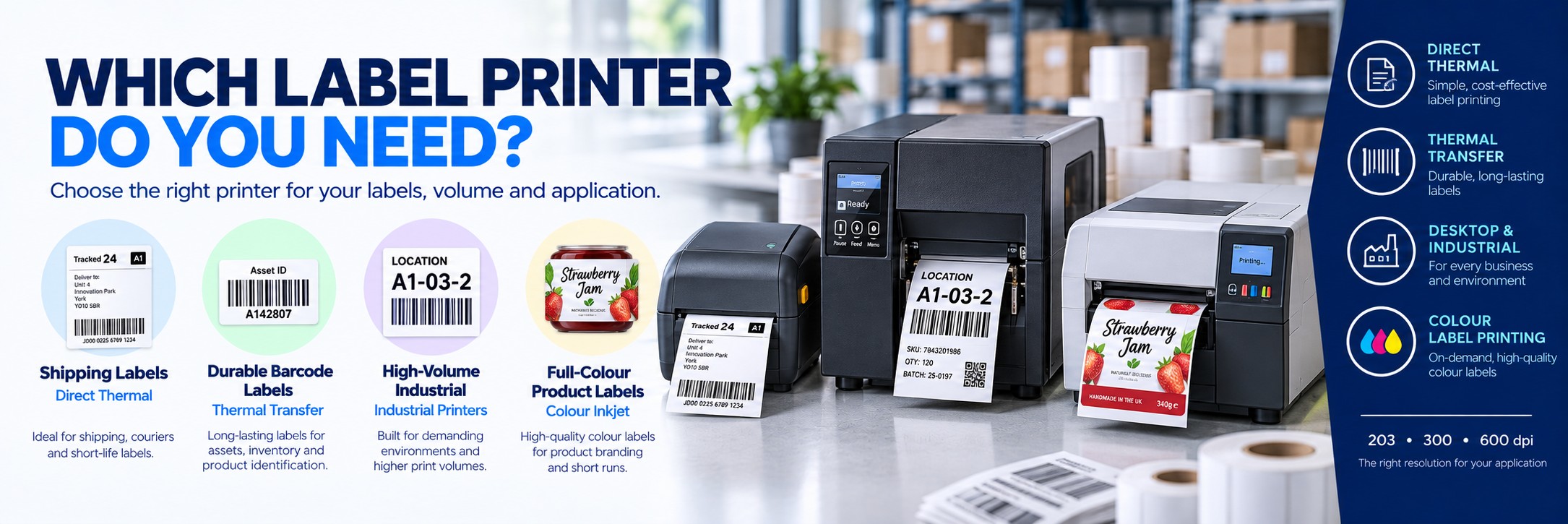
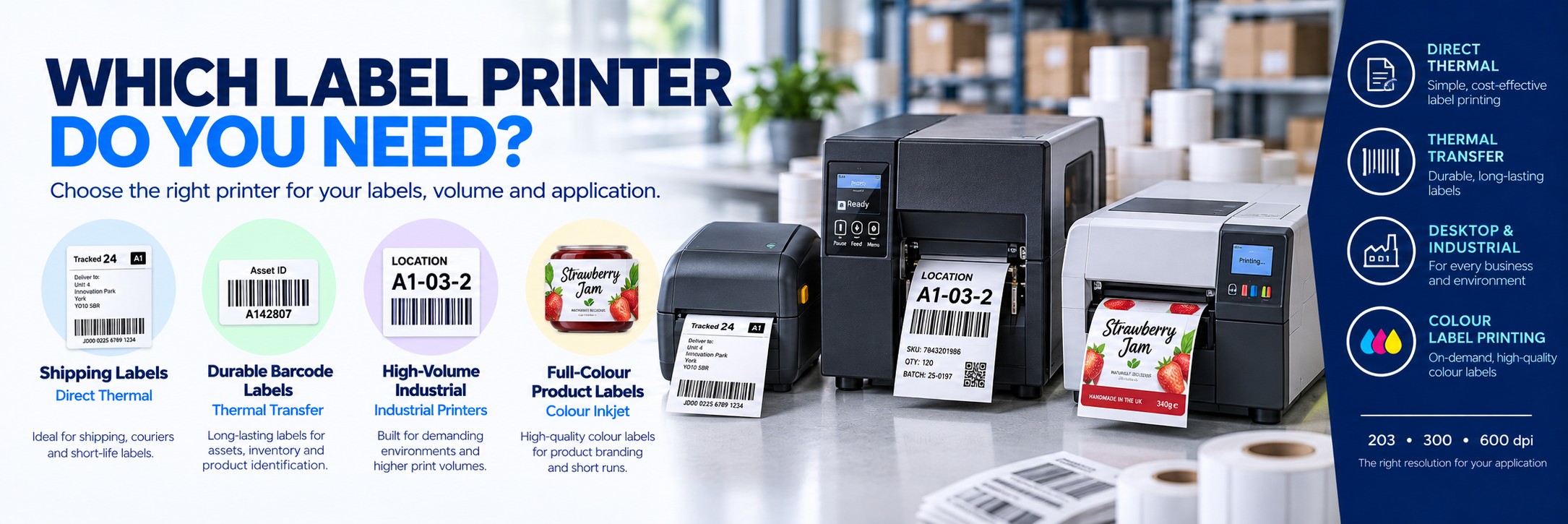
Quick Answer: Which Label Printer Do I Need?
Shipping Labels
Direct thermal
A simple choice for short-life shipping, courier and dispatch labels where no ribbon is required.
Product & Asset Labels
Thermal transfer
Better suited where labels need greater durability and longer life.
High-Volume Warehouse
Industrial printer
Designed for higher print volumes and more demanding operating environments.
Full-Colour Product Labels
Colour inkjet label printer
Ideal when labels need branding, photography, colour coding or high-quality product graphics.
Start with four questions: Do you need colour? How long must the label last? How many labels will you print? What size labels do you need?
What Type of Label Printer Do You Need?
There isn't one type of label printer that is right for every business. Different technologies solve different problems.
SHORT-LIFE LABELS
Direct Thermal
Prints onto heat-sensitive media without a ribbon.
Common uses: shipping, courier, picking and short-life logistics labels.
DURABLE LABELS
Thermal Transfer
Uses a thermal ribbon to transfer the printed image onto the label.
Common uses: product, asset, inventory and longer-life barcode labels.
FULL COLOUR
Colour Label Printer
Uses inkjet technology to produce full-colour labels on demand.
Common uses: food, drink, cosmetics, candles, retail products and packaging.
1. Direct Thermal or Thermal Transfer?
This is one of the first decisions when choosing a monochrome barcode or business label printer.
NO RIBBON
Direct Thermal
The printhead heats specially coated thermal media, causing the label to darken where the image is required.
Advantages:
- No thermal ribbon required
- Fewer consumables to manage
- Simple operation
- Well suited to short-life labels
Consider for: shipping labels, courier labels, temporary identification and short-term logistics applications.
MORE DURABLE
Thermal Transfer
The printhead heats a ribbon and transfers the printed image from that ribbon onto the label material.
Advantages:
- More durable printed image
- Suitable for longer-life labels
- Wide range of label materials
- Different ribbon formulations available
Consider for: asset labels, product labels, inventory, manufacturing and labels that need to remain readable for longer.
2. Desktop, Industrial or Mobile Label Printer?
The physical class of printer should match your print volume, environment and workflow.
COMPACT
Desktop Label Printer
Compact printers designed to sit on a desk, counter or packing bench.
Best for:
- Lower to moderate print volumes
- Retail
- Small warehouses
- Offices
- Healthcare
- Shipping stations
HIGH VOLUME
Industrial Label Printer
More robust printers designed for demanding environments and higher print volumes.
Best for:
- Warehouses
- Manufacturing
- Distribution centres
- Production lines
- High-volume shipping
PRINT ANYWHERE
Mobile Label Printer
Portable battery-powered printers allow labels or receipts to be printed at the point of activity.
Best for:
- Warehouse labelling
- Retail markdowns
- Field service
- Delivery
- Mobile workforce applications
Need to print labels on the move?
If your team prints labels at the point of activity rather than at a fixed workstation, a portable mobile printer may be a better fit.
Our Mobile Printer Selector helps you explore Zebra, Honeywell, Bixolon, Brother and TSC printers for warehouse labelling, deliveries, retail and field-service applications.
Find Your Mobile Printer →3. How Many Labels Will You Print?
Print volume is one of the clearest indicators of the printer class you need.
Occasional Printing
A desktop printer is often sufficient for smaller batches, occasional shipping labels and lighter business use.
Regular Daily Printing
Look at media capacity, ribbon length, print speed and how frequently staff will need to reload consumables.
High-Volume Printing
An industrial printer can reduce interruptions through larger media capacity, robust construction and designs intended for heavier workloads.
Don't choose solely by the manufacturer's maximum print speed. A printer that constantly needs new rolls or ribbons can slow down a busy operation even if its headline print speed is high.
4. What Print Resolution Do You Need?
Thermal label printers are commonly available with resolutions around 203, 300 and 600dpi.
203dpi
General-purpose printing
Suitable for many shipping labels, warehouse labels and normal-sized barcodes and text.
300dpi
More detail
A good choice for smaller text, denser layouts, smaller barcodes and applications requiring a sharper printed result.
600dpi
Very fine detail
Useful for specialist applications involving very small labels, fine text or particularly dense barcode and graphic requirements.
Higher DPI isn't automatically better. A 203dpi printer may be perfectly suitable for a 100 × 150mm shipping label. Paying for 600dpi makes sense only when the label design actually needs the extra resolution.
5. What Label Width Do You Need?
Always check the printer's supported media width and maximum printable width against the labels you intend to use.
4-Inch Label Printers
The most common general-purpose class. Suitable for many shipping, warehouse, product and barcode-label applications.
Wider or Specialist Printers
Some applications need wider media or unusual label formats. Check the exact printer specification rather than assuming every label printer supports the same roll size.
Also consider the label's length, roll diameter, core size and gap or mark sensing requirements.
6. Which Label Material Are You Printing?
The printer, ribbon and label material need to work together.
Paper Labels
A cost-effective choice for many shipping, retail, warehouse and general identification applications.
Synthetic Labels
Useful where greater resistance to moisture, abrasion or handling is required.
Specialist Materials
Some applications require freezer labels, chemical-resistant materials, removable adhesives or other specialised media.
7. Which Thermal Ribbon Do You Need?
Thermal-transfer printers need a compatible ribbon. The correct ribbon depends on the label material, required durability and printer.
Wax Ribbon
Commonly used with paper labels for general barcode, shipping and inventory applications where extreme durability isn't required.
Wax / Resin Ribbon
Provides greater resistance than standard wax and can suit coated paper and some synthetic materials.
Resin Ribbon
Designed for more demanding applications and compatible synthetic materials where resistance to abrasion, chemicals or environmental exposure is required.
8. Do You Need Full-Colour Labels?
A conventional thermal label printer is excellent for black text, barcodes and graphics, but it isn't designed to reproduce full-colour branding and product artwork.
If your labels need logos, photography, colour coding, ingredients, promotional graphics or premium packaging designs, consider a colour inkjet label printer.
Food & Drink
Produce colourful labels for jars, bottles, sauces, preserves, coffee, bakery products and other packaged foods.
Cosmetics & Skincare
Print branded labels in smaller batches without holding large stocks of pre-printed designs.
Product Manufacturing
Produce different label versions, SKUs and short runs when required.
Looking for a full-colour label printer?
Use our Epson ColorWorks Printer Selector to explore suitable colour label printers based on your label sizes, applications and production requirements.
Explore Epson ColorWorks Printers →9. USB, Ethernet, Wi-Fi or Bluetooth?
Think about where the printer will sit and which devices need to print to it.
USB
Simple direct connection between one computer and the printer.
Ethernet
Useful where the printer needs to be available over a wired network.
Wi-Fi
Provides greater placement flexibility where a compatible wireless network is available.
Bluetooth
Common on mobile printers and useful for compatible tablets, handheld computers and mobile devices.
Different configurations within the same printer family can have different interfaces. Always check the exact manufacturer part number before ordering.
10. Cutter, Peeler or Standard Tear-Off?
How the finished label leaves the printer can affect the workflow just as much as print speed.
Tear-Off
The user tears the printed label or strip from the printer. Simple and suitable for many general applications.
Peeler / Dispenser
The printer separates the label from the backing, making it ready for immediate application.
Cutter
An integrated cutter automatically cuts media after printing, useful for certain continuous-media and batch workflows.
11. Label Printer for Shipping & Courier Labels
Shipping labels are one of the simplest label-printer applications.
For standard courier and dispatch labels, look for:
Suitable print width
Confirm support for your shipping-label dimensions.
Confirm support for your shipping-label dimensions.
Direct thermal printing
Often the simplest choice for short-life shipping labels.
Often the simplest choice for short-life shipping labels.
203dpi
Usually sufficient for normal shipping barcodes and address text.
Usually sufficient for normal shipping barcodes and address text.
USB or network connectivity
Choose based on how many workstations need access.
Choose based on how many workstations need access.
If the same printer also needs to produce longer-life product or inventory labels, a thermal-transfer-capable model may provide greater flexibility.
12. Label Printer for Warehouse & Logistics
Warehouse printers may produce shipping labels, pallet labels, location labels, inventory labels and product identification throughout the day.
For heavier use, consider:
Industrial construction
Designed for demanding working environments.
Designed for demanding working environments.
Larger media capacity
Reduces interruptions for roll changes.
Reduces interruptions for roll changes.
Longer ribbons
Useful for high-volume thermal-transfer printing.
Useful for high-volume thermal-transfer printing.
Network connectivity
Allows appropriate systems to access shared printers.
Allows appropriate systems to access shared printers.
Print speed
Important where large batches need producing quickly.
Important where large batches need producing quickly.
203 or 300dpi
Choose according to barcode size and label detail.
Choose according to barcode size and label detail.
13. Label Printer for Manufacturing
Manufacturing applications often need more durable labels and more robust printers than a normal office environment.
Consider the conditions the finished label will face:
Abrasion
Will the printed image be repeatedly rubbed or handled?
Chemicals
Will labels be exposed to cleaning agents, oils or other substances?
Temperature
Will the label experience heat, cold or significant temperature changes?
Outdoor Exposure
Will moisture, sunlight or weather affect the label?
Label Lifespan
Does identification need to remain readable for days, months or years?
Surface
What material and shape will the label be applied to?
For durable manufacturing labels, the label material + adhesive + ribbon can be just as important as the printer itself.
14. Popular Label Printer Brands
Zebra Label Printers
Zebra offers desktop, industrial and mobile thermal label printers for retail, warehouse, logistics, manufacturing and other business applications.
TSC Label Printers
TSC produces a broad range of desktop, industrial and mobile label printers covering entry-level through high-volume applications.
Epson Colour Label Printers
Epson ColorWorks printers produce full-colour labels on demand for product labelling, packaging, manufacturing and specialist applications.
15. Popular Label Printer Families
| Printer | Type | Good For |
|---|---|---|
| Zebra ZD421 | Desktop thermal | General business, shipping, retail, healthcare and barcode labels |
| Zebra ZD621 | Premium desktop thermal | More demanding desktop applications and businesses needing additional features |
| Zebra ZT411 | Industrial thermal | Warehouse, manufacturing, distribution and higher-volume label printing |
| TSC DA220 | Desktop direct thermal | Shipping, courier and straightforward barcode-label applications |
| TSC TE Series | Desktop thermal | General barcode and business label printing |
| Epson ColorWorks C4000e | Desktop colour inkjet | Professional colour product labels and short-run in-house label production |
| Epson ColorWorks C6000 | Professional colour inkjet | Higher-volume colour labels and workflows needing cutter or peeler configurations |
16. Think About the Complete Cost
The cheapest printer isn't necessarily the cheapest system to run.
Compare:
Printer price
The initial hardware cost.
The initial hardware cost.
Labels
Cost and availability of the media you actually need.
Cost and availability of the media you actually need.
Ribbons
Required for thermal-transfer printing.
Required for thermal-transfer printing.
Ink
Relevant for colour inkjet label printers.
Relevant for colour inkjet label printers.
Printheads
A wear item on thermal printers.
A wear item on thermal printers.
Downtime
Reliability matters where printing is operationally critical.
Reliability matters where printing is operationally critical.
Label Printer Buying Checklist
Colour or monochrome?
Do you need full-colour branding or only text and barcodes?
Do you need full-colour branding or only text and barcodes?
Label lifespan?
Minutes, days, months or years?
Minutes, days, months or years?
Print volume?
Occasional batches or continuous daily printing?
Occasional batches or continuous daily printing?
Label size?
Width, length, roll diameter and core size.
Width, length, roll diameter and core size.
Print resolution?
203, 300 or 600dpi?
203, 300 or 600dpi?
Media material?
Paper, synthetic or specialist material?
Paper, synthetic or specialist material?
Direct thermal or transfer?
Do you need a ribbon?
Do you need a ribbon?
Connectivity?
USB, Ethernet, Wi-Fi or Bluetooth?
USB, Ethernet, Wi-Fi or Bluetooth?
Printer class?
Desktop, industrial or mobile?
Desktop, industrial or mobile?
Exact MPN?
Are suppliers quoting the same configuration?
Are suppliers quoting the same configuration?
Label Printer FAQs
What type of label printer do I need for shipping labels?
A direct-thermal desktop printer is suitable for many short-life shipping and courier labels. Check the required label size and compatibility with your shipping software before ordering.
What is the difference between direct thermal and thermal transfer?
Direct thermal prints onto heat-sensitive label material without a ribbon. Thermal transfer uses a ribbon to transfer the image onto the label and is generally better suited to longer-life and more durable labelling.
Is 203dpi good enough for barcode labels?
Yes, 203dpi is suitable for many general-purpose barcode and shipping labels. Smaller barcodes, fine text and denser designs may benefit from 300dpi or higher.
Do I need a 300dpi label printer?
Choose 300dpi where your labels contain smaller text, smaller barcodes or more detailed graphics. Don't pay for additional resolution if your label design doesn't require it.
When do I need a 600dpi printer?
600dpi is mainly useful for specialist applications requiring very small labels, very fine text or particularly dense barcode and graphic detail.
Should I buy a desktop or industrial label printer?
Desktop printers suit lighter and moderate workloads. Industrial printers are designed for higher-volume and more demanding environments, with larger media capacity and more robust construction.
Can a thermal label printer print in colour?
Conventional thermal barcode printers are primarily used for monochrome printing. If you need full-colour product artwork, consider a dedicated colour label printer such as an Epson ColorWorks model.
Do thermal printers need ink?
Direct-thermal printers don't use ink, toner or ribbon. Thermal-transfer printers use a thermal ribbon. Colour inkjet label printers use ink cartridges or ink packs depending on the model.
What size label printer do I need?
Choose based on the maximum label and printable width required, along with roll diameter, media thickness and any specialist media requirements.
Which label printer is best for a warehouse?
For lighter workloads, a desktop model may be sufficient. High-volume warehouse operations often benefit from an industrial printer with larger media capacity, robust construction and suitable network connectivity.
Can Tek Direkt quote for multiple label printers?
Yes. If you already know the manufacturer part number and quantity required, send them over and we can provide another business price to compare.
MORE FREE BUYING TOOLS
Explore all Tek Direkt Product Finders
Need help choosing other business hardware? Explore our free interactive tools for barcode scanners, label printers, mobile printers, mobile computers and Epson printing solutions.
Explore All Product Finders →Still Not Sure Which Label Printer You Need?
Start with the label itself: tell us the label size, material, print volume, required lifespan and whether you need colour.
If you already know the printer or manufacturer part number, send us the MPN and quantity and we'll see what we can do on price.
No calls. No meetings. No messing about. Just another price to compare.