
Epson ColorWorks D3800e Visitor Badge Printer
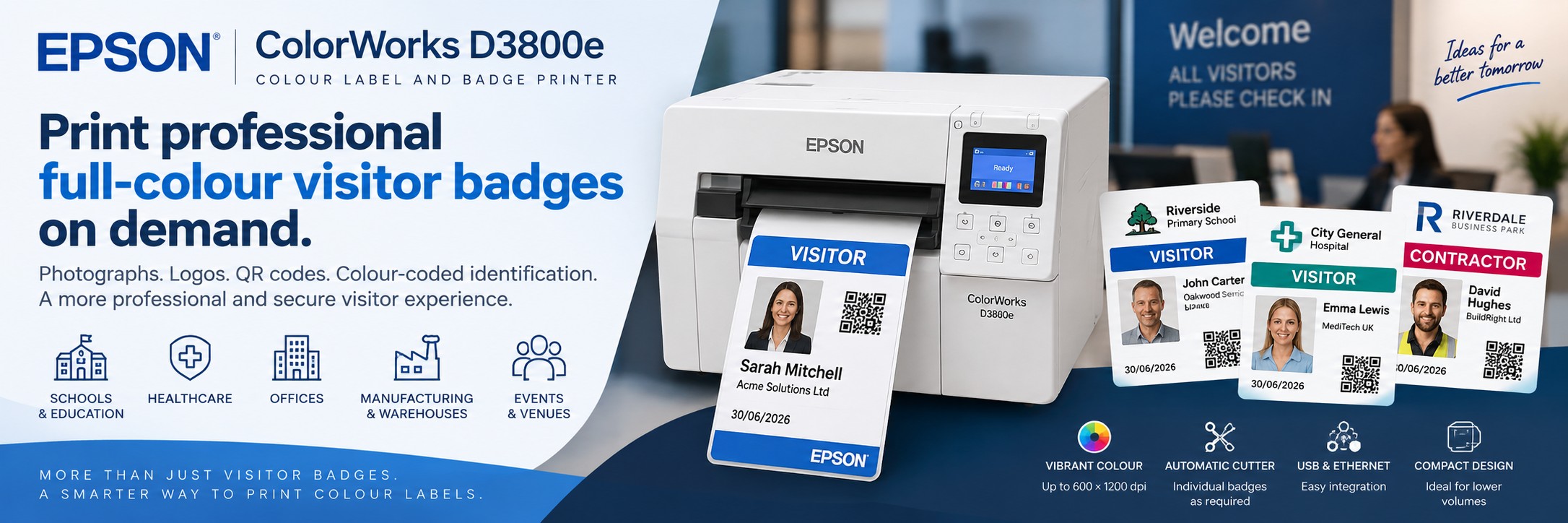
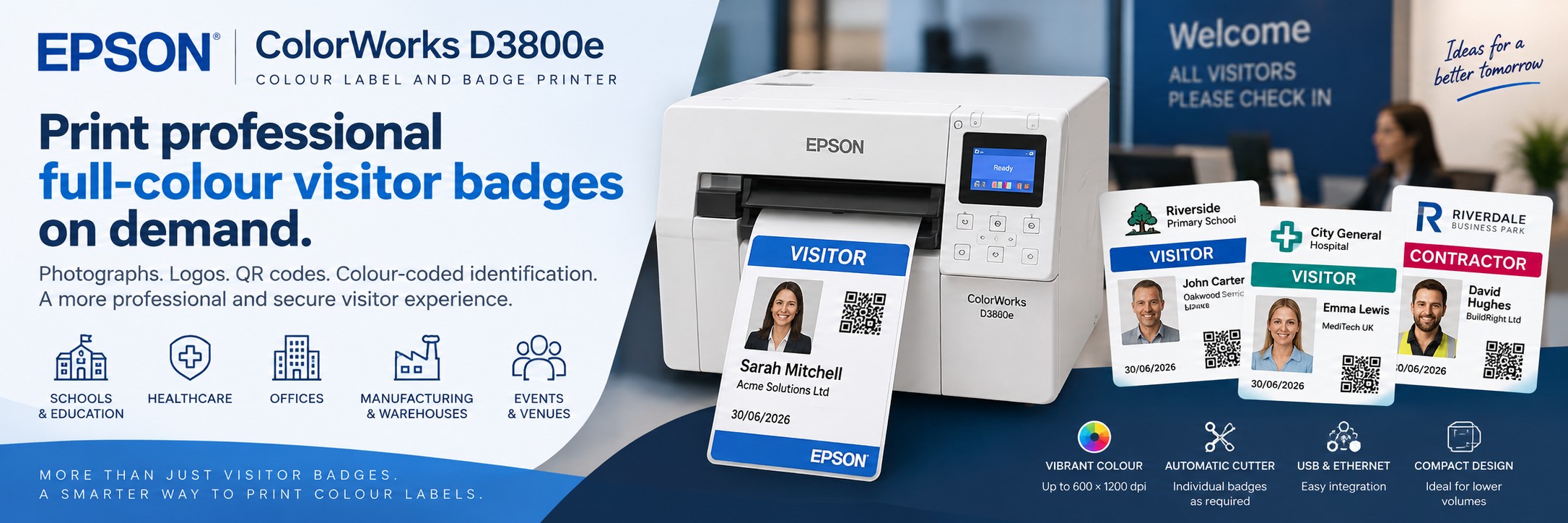
Print professional full-colour visitor badges, passes and temporary identification on demand.
The Epson ColorWorks D3800e gives facilities teams, offices, schools, healthcare organisations, warehouses, distribution centres, manufacturing sites and venues a compact way to produce personalised visitor passes as people arrive.
Print visitor photographs, names, company details, host information, dates, colour-coded visitor types, QR codes, barcodes and your own branding on the same badge.
With an integrated automatic cutter, USB and Ethernet connectivity and a compact desktop design, the D3800e can become the colour printing element of a modern reception or visitor-management workflow.
Epson ColorWorks D3800e at a Glance
Full Colour
Print photographs, logos, colour coding and personalised visitor information on demand.
Up to 100mm/sec
Produce individual passes quickly at reception and visitor check-in points.
600 × 1200 dpi
High-resolution output for photographs, text, graphics, QR codes and suitable barcodes.
108mm Print Width
Supports a broad range of badge, pass, ticket and label formats.
Automatic Cutter
Individual passes can be cut automatically after printing.
USB & Ethernet
Connect directly to suitable reception and business systems.
Dye Ink
Designed to deliver vibrant colour and rich black tones, particularly on suitable glossy media.
Compact Desktop Design
Front-access operation helps the printer fit into reception areas where workspace is limited.
Why Print Visitor Badges in Colour?
A visitor badge can do much more than display someone's name. Colour, photography and personalised information can make different visitor types easier to distinguish at a glance.
Visitor Photograph
Add a photograph captured during registration to provide additional visual identification.
Colour Coding
Use different badge designs or colours for visitors, contractors, temporary staff and other groups.
Company Branding
Produce visitor passes that reflect your organisation rather than relying on generic handwritten labels.
Clear Information
Display the visitor's name, company, host, date and other information relevant to your visitor process.
What Can You Put on a Visitor Badge?
Visitor Name
Display the visitor's name clearly for reception and site personnel.
Visitor Photograph
Add a full-colour image where your visitor-management process captures photographs.
Company
Identify the organisation or contractor the visitor represents.
Host
Show the employee, department or person the visitor is meeting.
Date
Make the intended day of use visible on the badge.
Visitor Type
Differentiate general visitors, contractors, suppliers or other categories.
QR Code or Barcode
Include machine-readable information where supported by your visitor-management workflow.
Safety Information
Add suitable site-specific information, instructions or visual indicators where required.
From Visitor Check-In to Printed Pass
1
Visitor Arrives
The visitor registers at reception, a kiosk, tablet or other check-in point according to your visitor-management process.
2
Capture Details
Name, company, host and other information can be entered. A photograph can also be captured where supported by the system.
3
Create the Pass
The visitor-management or badge software generates the required badge design using the captured information.
4
Print & Cut
The D3800e prints the personalised colour pass and its integrated cutter separates it ready for issue.
Print Visitor Passes When People Arrive
On-demand printing means personalised visitor passes do not need to be prepared in advance.
Unexpected Visitors
Create a personalised pass immediately for visitors who were not pre-registered.
Last-Minute Changes
Update visitor details or badge designs without wasting pre-printed personalised passes.
Different Visitor Types
use one printer to produce different pass designs according to the person checking in.
Visitor Badge Printing for Schools & Education
Schools, colleges, universities and multi-academy trusts can use personalised colour passes as part of their wider visitor identification and safeguarding procedures.
Parents & Guardians
Create temporary identification for visitors attending meetings, events or appointments.
Contractors
Use a distinctive colour or design to make contractors easier to distinguish from other visitors.
Supply & Temporary Staff
Produce appropriate temporary passes according to the organisation's own identification procedures.
Events & Open Days
Print passes for open days, meetings, training events and other temporary visitors.
Visitor Badges for Offices & Corporate Sites
Replace handwritten visitor labels with professional passes that match your organisation's branding and reception experience.
Branded Passes
Add company logos, brand colours and a consistent badge design.
Visitor Photos
Print photographs where the visitor-management workflow captures an image during check-in.
Host Information
Show who the visitor is meeting or which department they are visiting.
Temporary Access
Add dates, visitor categories or suitable visual information according to site procedures.
Visitor Badge Printing for Facilities Management
Facilities teams are often responsible for managing a constant flow of visitors, contractors, engineers, suppliers and temporary staff. The Epson ColorWorks D3800e provides a professional way to print personalised full-colour visitor badges on demand as people arrive on site.
Use different colours, designs and information to make visitor categories easier to distinguish, while maintaining consistent company branding across your reception and visitor-management process.
Visitors & Guests
Print professional personalised passes containing names, company details, host information, photographs and dates.
Contractors & Engineers
Use distinctive colours or badge designs to help differentiate contractors, maintenance teams and visiting engineers.
Suppliers & Temporary Staff
Produce temporary identification on demand for suppliers, agency workers and other personnel requiring short-term site identification.
Reception Teams
Print personalised badges at the point of check-in rather than relying on handwritten labels or stocks of generic pre-printed visitor passes.
Managing Multiple Buildings or Client Sites?
The D3800e is also particularly relevant to facilities management companies operating across multiple client locations.
Individual sites can use their own visitor badge templates, branding and identification requirements while using the same D3800e printing platform. This can help facilities providers create a more consistent approach to on-demand visitor badge printing across their managed estate.
Client Branding
Create different badge templates for individual customers, buildings or locations while retaining each client's branding.
Multi-Site Rollouts
Deploy the same printer platform across multiple reception desks and managed locations where appropriate.
Business Pricing
Planning several installations? Tell us the number of locations and printers required and we can provide a straightforward business quote.
Visitor Badge Printing for Warehouses & Distribution Centres
Warehouses and distribution centres can have delivery drivers, contractors, engineers, suppliers, agency staff and general visitors moving through the site alongside permanent employees. The Epson ColorWorks D3800e provides a simple way to print clear, personalised colour visitor passes on demand as people arrive.
Delivery Drivers
Issue temporary identification for drivers and other logistics personnel according to your site's visitor and driver procedures.
Contractors & Engineers
Create visually distinctive passes containing names, companies, photographs and other appropriate visitor information.
Agency & Temporary Staff
Produce appropriate temporary identification for short-term and agency personnel according to your site's own procedures.
Suppliers & Visitors
Use different badge designs or colour coding to help distinguish different visitor groups around the facility.
Running more than one warehouse?
If you are considering visitor badge printing across several warehouses, depots or distribution centres, tell us the number of sites, approximate visitor volume and how you currently manage visitor identification.
Visitor Badge Printing for Manufacturing Sites
From visiting engineers and maintenance contractors to auditors, suppliers and customers, manufacturing sites welcome people with different reasons for being on site. Print personalised colour badges at reception or your visitor check-in point to help site teams identify who they are meeting.
Engineers & Maintenance Contractors
Use a distinctive badge design for visiting service engineers and maintenance contractors, showing their name, company, site contact and visit date.
Auditors & Inspectors
Prepare clearly identified visitor passes for planned audits, inspections and quality reviews, with the relevant host or department shown.
Suppliers & Customers
Create branded passes for supplier meetings, customer visits and factory tours, with visitor categories matched to your site's procedures.
Temporary Personnel
Produce temporary identification for agency personnel and other short-term site visitors where appropriate to your existing identification process.
Make the right details easy to see: include the visitor's name, company, host, date and visitor category. Use colour alongside clear text to distinguish visitor types, with photographs or site-specific instructions where supported by your badge design and visitor process.
Part of your existing site procedures.
Badge printing supports visual identification alongside your sign-in, induction, escort and access-control processes. A printed badge does not itself confirm induction completion or authorise entry to production areas.
Planning visitor badge printing for your manufacturing site? Tell us your daily visitor numbers, current sign-in software or process, preferred badge format and number of sites. We can help check the printing requirements and provide a quote.
Healthcare Visitor Badge Printing
Hospitals, clinics, care environments and other healthcare organisations can use personalised passes to support their own visitor-identification processes.
Visitors
Print clear temporary identification for people entering suitable areas of the site.
Contractors
Distinguish maintenance, technical and other external personnel.
External Professionals
Create appropriate temporary identification for visiting professionals and service providers.
Departments
Use suitable colours or badge information to support local visitor-routing procedures.
Event, Conference & Attendee Badges
The D3800e is not limited to permanent reception desks. On-demand printing also suits events where attendee information changes right up until registration.
Conferences
Print personalised attendee passes as delegates register.
Exhibitions
Create badges containing names, companies, categories and suitable machine-readable information.
Training Days
Produce temporary identification for attendees and external trainers.
Corporate Events
Combine professional branding with personalised attendee information.
Epson uPass Visitor Management
Epson also provides its uPass App for compatible ColorWorks visitor-pass workflows.
Epson describes uPass as a visitor-management solution that can support registration, visitor data, photographs and personalised pass printing through compatible ColorWorks hardware.
Self-Registration
Visitors can register using a suitable tablet or device as part of the uPass workflow.
Visitor Photos
Capture visitor photographs directly as part of the registration process.
Pass Templates
Manage badge templates and visitor information for personalised printing.
CSV Upload
Bulk visitor data can be uploaded for suitable pre-planned events and visitor groups.
Standard UK Pass Size
Epson states that uPass supports the standard 54 × 86mm UK pass format.
ColorWorks Integration
The solution is designed to integrate visitor registration with compatible Epson ColorWorks pass printing.
Already using another visitor-management platform?
You do not necessarily need to change systems. Printer compatibility depends on your software, operating environment, drivers, media and integration method, so check these before ordering.
Software & Integration Options
The D3800e is designed for more than standalone printing. Epson provides a range of drivers, printer languages, SDKs and middleware integration options.
ESC/Label
Epson's label printer command language supports integration with suitable business applications.
ZPL II Emulation
Provides an additional route for suitable existing label-printing environments.
Label Software
Epson lists native middleware support for platforms including BarTender, Loftware Cloud and TEKLYNX/CODESOFT.
SDKs
Epson provides SDK support for iOS, Android and web applications for suitable integration projects.
Visitor Pass Media & Badge Sizes
The D3800e supports roll and fanfold media with widths from approximately 25mm to 108mm, including continuous media, die-cut labels and black-mark media.
Continuous Media
The automatic cutter allows passes to be produced at suitable variable lengths from compatible continuous media.
Die-Cut Media
Use suitable pre-shaped label stock where a fixed badge or label format is required.
Ticket Media
Compatible ticket-style media can provide a more substantial pass format for visitor and event applications.
Need a particular badge size?
Tell us the width, height, intended badge holder or clip arrangement and whether you want adhesive or non-adhesive media so the complete printing requirement can be checked.
Vibrant Dye-Ink Colour Printing
The ColorWorks D3800e differs from many other Epson ColorWorks printers because it uses a dye-based ink system.
Visitor Photographs
High-resolution colour output makes the D3800e particularly interesting where passes include photographs and other visual identification.
Brand Colours
Produce vibrant logos, graphics and coloured visitor categories on suitable media.
Glossy Media
Epson specifically designed the dye-ink platform to deliver vibrant colour and rich black tones on compatible glossy media.
Integrated Automatic Cutter
The built-in cutter is particularly useful for visitor passes because individual badges can be printed and separated automatically as each person checks in.
Print One at a Time
Produce an individual personalised pass without needing to prepare an entire sheet.
Variable Information
Each printed pass can contain different visitor details and artwork.
Reception Workflow
Print and cut the pass at the point of check-in ready for issue to the visitor.
Epson ColorWorks D3800e Specifications
| Specification | Epson ColorWorks D3800e |
|---|---|
| Printer Type | Desktop colour label / badge printer |
| Printing Technology | Epson PrecisionCore printhead |
| Ink Technology | Dye-based colour ink |
| Maximum Print Resolution | 600 × 1200 dpi |
| Maximum Print Speed | Up to 100mm/sec at 300 × 600 dpi under Epson's specified test conditions |
| Maximum Print Width | 108mm |
| Media Width | 25–108mm |
| Media | Roll and fanfold |
| Media Types | Continuous, die-cut, black-mark paper and black-mark labels |
| Automatic Cutter | Yes – integrated |
| Printer Languages | ESC/Label and ZPL II emulation |
| Dimensions | 310 × 283 × 285mm |
| Weight | Approximately 13kg |
| MPN | C31CK03202 |
Colour Visitor Badges vs Monochrome Visitor Labels
| Requirement | Typical Monochrome Badge Printer | Epson D3800e |
|---|---|---|
| Visitor Name | Yes | Yes |
| Full-Colour Photograph | No | Yes |
| Full-Colour Logo | No | Yes |
| Colour-Coded Visitor Types | Limited | Yes |
| QR Codes / Barcodes | Possible on suitable systems | Possible on suitable systems |
| Different Designs | Limited by printing technology and media | Full-colour designs can be changed digitally |
| On-Demand Personalisation | Yes | Yes |
If all you need is a visitor's name printed in black on a basic temporary badge, a thermal printer may be sufficient. The D3800e becomes more compelling when photographs, colour coding, branding and richer visual identification are useful.
More Than a Visitor Badge Printer
The D3800e is a desktop colour label printer, so it can continue to provide value when the reception desk isn't busy.
Event Passes
Create personalised conference, meeting and training passes.
Shelf Labels
Produce suitable colour shelf-edge and promotional labels.
Product Labels
Print short runs of colour product labels using compatible media.
Internal Labels
Create colour-coded information, identification and QR code labels around the organisation.
See a Visitor Badge Sample Before You Buy
It is much easier to judge a colour visitor-pass solution when you can see the actual print quality and media rather than relying on a screen image.
Send Your Design
If you already have a visitor-pass design, send us the artwork and intended dimensions.
See the Output
Assess colour, photographs, text, branding and overall presentation using a physical print sample.
Check the Application
We can use the sample discussion to help establish the printer and media requirements for your intended workflow.
Planning a Visitor Badge Printing Setup?
Before ordering, establish how the printer will fit into the complete visitor-management process.
Visitor Software
Which visitor-management, reception or badge-design software are you using?
Badge Size
What width and height do you want the finished visitor pass to be?
Badge Volume
Approximately how many visitor passes will be printed each day?
Visitor Photo
Will photographs be captured and printed as part of the check-in process?
QR / Barcode
Does the visitor pass need to contain machine-readable information?
Media Type
Will the pass be adhesive, inserted into a holder or attached using another method?
Connectivity
Confirm how the reception system will communicate with the printer.
Number of Sites
Consider whether you need one reception printer or a multi-site rollout.
Epson D3800e Visitor Badge FAQs
Can the D3800e print visitor photographs?
Yes. The D3800e is a full-colour printer and can reproduce photographs as part of a suitable visitor-pass design.
Can it print one badge at a time?
Yes. Its integrated automatic cutter makes it suitable for producing individual passes on demand from compatible media.
Can I print QR codes?
Yes, QR codes and suitable barcodes can be incorporated into the artwork. The wider visitor system determines what the code contains and how it is used.
Does the D3800e use pigment ink?
No. The ColorWorks D3800e uses dye-based ink. Epson developed the system for vibrant colours and rich black tones, particularly on compatible glossy media.
Does it have a cutter?
Yes. An automatic cutter is included in the D3800e.
How wide can it print?
Epson specifies a maximum print width of 108mm and supported media widths from 25mm to 108mm.
Will it work with my visitor-management software?
Compatibility depends on the software, operating environment and integration method. Tell us which platform you use so the requirements can be checked before ordering.
Is it only for visitor badges?
No. The D3800e is a desktop colour label printer and can also be used for suitable product labels, tickets, shelf labels and other short-run colour applications.
Can I see a visitor badge sample before buying?
Yes. Tek Direkt can arrange Epson ColorWorks print samples so you can assess the colour, photographs, text and overall appearance before choosing a printer.
What information should I send when requesting a quote?
Tell us your visitor-management software, intended badge dimensions, approximate daily visitor volume, number of sites and whether the badges need photographs, QR codes or barcodes.
Buy Epson ColorWorks D3800e from Tek Direkt
Application Help
Tell us what you want on the visitor badge and how your current check-in process works.
Free Print Samples
See a physical Epson ColorWorks sample before deciding whether colour visitor passes are right for you.
Business Pricing
Need several printers for multiple receptions or sites? Send us the MPN and quantity for a business quote.
Epson ColorWorks
Compare the D3800e with other Epson ColorWorks printers if you also have product, packaging or higher-volume colour-label requirements.
Need Colour Label Printing Rather Than Visitor Badges?
The D3800e is particularly focused on visitor passes, badges, tickets and other applications where vibrant dye-based colour output is useful.
If your main requirement is product, packaging, chemical, horticultural or higher-volume colour label printing, compare the other Epson ColorWorks models.
Epson ColorWorks C4000e
Compact desktop colour label printing for shorter runs, changing product designs and flexible in-house label production.
Epson ColorWorks C6000 Series
Production-focused colour label printing with a choice of auto-cutter and built-in peeler configurations.
Epson ColorWorks C8000e
Higher-throughput industrial colour label printing for businesses with more demanding production volumes.
Different job, different ColorWorks printer.
Choose the D3800e primarily for visitor-pass and badge applications. Consider the C4000e, C6000 or C8000e when product and production label printing is the main requirement.
Need a Visitor Badge Printing Solution?
Tell us your visitor-management software, badge size, approximate daily volume and what information you want to print.
If you already know what you need, send us Epson MPN C31CK03202 and the quantity for a straightforward price.
Rolling the solution out across several offices, schools, warehouses, distribution centres, manufacturing sites, managed facilities or client sites? Send us the number of locations and printers required.
No calls. No meetings. No messing about. Just straightforward help and a price.