
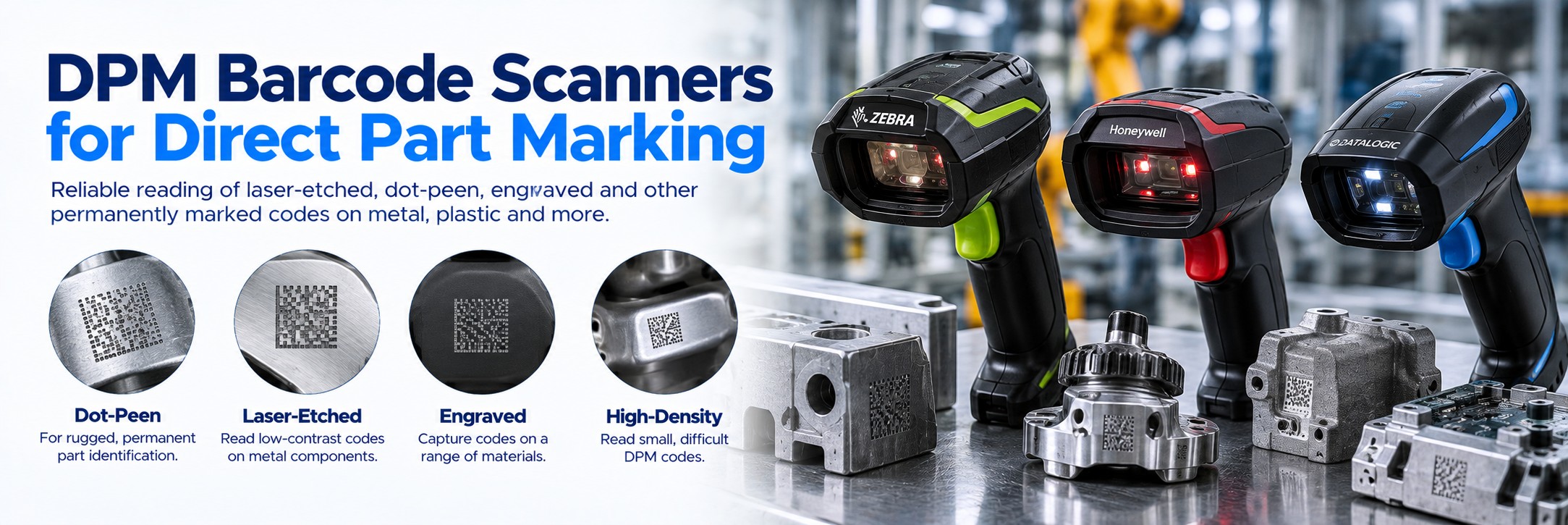
DPM Barcode Scanners for Direct Part Marking
DPM barcode scanners are designed to read difficult machine-readable codes marked directly onto components and products. They are used where conventional printed barcode labels are unsuitable or where permanent identification is required throughout the life of a part.
Choose specialist DPM scanners for laser-etched, dot-peen, engraved and other directly marked codes used in manufacturing, automotive, aerospace, electronics and engineering.
Already have an existing DPM code? Don't choose a scanner from the barcode symbology alone. The marking method, material, surface finish, code size and working distance can all affect readability.
Which DPM Scanner Do You Need?
Laser-Etched Codes
Specialist DPM imager
For permanent marks created by laser on metal, plastic and other component surfaces.
Dot-Peen Codes
DPM scanner with suitable illumination
For codes formed by small indentations in metal and other industrial components.
Small Data Matrix
High-density DPM optics
For small components, electronics and applications where codes have very small cells.
Production Automation
Fixed industrial reader
For controlled production lines where parts move through a repeatable scanning position.
The key question isn't simply “Will it read Data Matrix?” A standard 2D scanner may read a Data Matrix code printed on a label but struggle with the same symbology when it is laser etched or dot-peened onto a reflective component.
What Is Direct Part Marking?
Direct Part Marking, usually shortened to DPM, permanently applies a machine-readable identifier directly onto a component instead of attaching a separate barcode label.
Laser Marking
A laser creates a permanent mark on the component surface. Readability depends on the material, finish, contrast and marking process.
Dot Peen
A series of small indentations forms the code. The scanner may need to interpret the shape of the mark using specialised illumination.
Etching & Engraving
Permanent marking processes can create identification that remains associated with the component rather than relying on an adhesive label.
Data Matrix is particularly common in DPM applications because a substantial amount of information can be encoded within a compact two-dimensional symbol.
Why Can't I Use a Normal Barcode Scanner?
A conventional barcode scanner usually works with a relatively predictable target: dark bars or cells printed against a contrasting background.
DPM codes can present much harder optical problems.
Low Contrast
The mark and component surface may be very similar in colour.
Reflective Metal
Scanner illumination can create glare that obscures parts of the code.
Surface Texture
Machining marks, casting and other textures can interfere with the image.
Very Small Codes
Electronics and compact components may use extremely small Data Matrix symbols.
Curved Components
The complete symbol may not sit on a flat plane facing the scanner.
Physical Indentations
Dot-peen codes rely partly on the way light interacts with the marked surface.
DPM Scanner vs Standard 2D Barcode Scanner
| Requirement | Standard 2D Scanner | DPM Scanner |
|---|---|---|
| Printed Data Matrix | Generally suitable with compatible symbology support | Suitable |
| Printed QR Codes | Generally suitable with compatible symbology support | Usually supported depending on model |
| Laser-Etched Code | May be unreliable depending on the mark | Designed for these more challenging applications |
| Dot-Peen Code | May struggle | Specialist DPM configuration recommended |
| Reflective Metal | Can be challenging | Specialised illumination and processing can improve capture |
| Very Small DPM | Depends heavily on optics and code size | Choose an appropriate high-density DPM configuration |
DPM Scanners for Manufacturing
Permanent component identification makes DPM particularly useful for manufacturing traceability.
Component Marking
→
Production
→
Assembly
→
Inspection
→
Finished Product
Component identification
Associate a unique identifier with an individual part.
Associate a unique identifier with an individual part.
Work in progress
Capture the component at different production stages.
Capture the component at different production stages.
Assembly verification
Confirm the correct components are used during assembly.
Confirm the correct components are used during assembly.
Quality control
Connect inspection information with a specific component.
Connect inspection information with a specific component.
Batch & serial traceability
Support detailed production records.
Support detailed production records.
Maintenance
Retain identification beyond the original manufacturing process.
Retain identification beyond the original manufacturing process.
DPM Scanners by Industry
Automotive
Scan permanent codes on machined components, engine parts, transmission components, bearings, assemblies and other automotive parts.
Aerospace
Support identification and traceability where individual components need to remain identifiable through production, inspection and maintenance.
Electronics
Capture compact Data Matrix and other codes used on smaller components and electronic assemblies.
Engineering
Read codes marked onto machined, cast, polished and textured components.
Manufacturing
Track components through production, assembly, inspection and quality-control processes.
Industrial Traceability
Connect permanent component identification with production and lifecycle records.
DPM Barcode Scanner Manufacturers & Models
Specialist DPM scanner configurations are available from leading manufacturers. Always check the complete manufacturer part number, as a standard 2D scanner and its DPM-capable counterpart may have different optics, illumination and scanning performance.
Zebra DPM Barcode Scanners
Zebra DS4608-DPE
A specialist configuration of the DS4608 family designed for direct-part marks and high-density barcode applications.
Zebra DS3608 DPM Configurations
Ultra-rugged corded industrial scanners with specialist DPM configurations for challenging manufacturing and component identification.
Zebra DS3678 DPM Configurations
Ultra-rugged cordless scanning with specialist configurations for direct-part marking and industrial applications.
Honeywell DPM Barcode Scanners
Honeywell Specialist DPM Scanners
Honeywell offers specialist barcode imaging solutions for manufacturing and challenging direct-part identification applications.
Confirm the exact DPM capability, code size and supported marking types before selecting a model.
Datalogic PowerScan DPM Barcode Scanners
Datalogic PowerScan PD9630-DPX
A specialist corded industrial scanner configuration designed for challenging Direct Part Marking applications.
Datalogic PowerScan PBT9600-DPX
A cordless Bluetooth industrial scanner configuration for specialist DPM applications.
Datalogic PowerScan PM9600-DPX
A cordless industrial scanner configuration for demanding direct-part marking and manufacturing applications.
Important: These links lead to scanner-family information pages, not necessarily to a specific DPM-capable SKU. Confirm the exact DPM configuration and test representative marks before ordering.
Handheld or Fixed DPM Scanner?
FLEXIBLE
Handheld DPM Scanner
An operator moves the scanner into the best position relative to the component.
Consider handheld when:
- Components vary in size
- Codes appear in different positions
- Parts are manually inspected
- One scanner serves several tasks
- Operators need to adjust the scan angle
AUTOMATION
Fixed DPM Scanner
A stationary reader captures codes as components pass a controlled point in the production process.
Consider fixed scanning when:
- Parts follow a consistent path
- Production is automated
- Scanning needs to happen automatically
- High throughput is required
- The code position is controlled
Corded or Cordless DPM Scanner?
Corded
A good choice for fixed production benches, inspection stations and other locations where the scanner remains close to the host system.
There is no scanner battery to charge or manage.
Cordless
Useful where operators need to move around larger parts, vehicles, assemblies or a wider working area.
Remember to consider batteries, charging and wireless range as part of the deployment.
Scanning performance against your actual mark should take priority over whether the scanner is corded or cordless.
How to Choose the Right DPM Scanner
For a normal barcode scanner, knowing the symbology and required working distance can sometimes be enough to narrow down the options.
For DPM, we need to know more about the actual mark.
Symbology
Data Matrix, QR, 1D or another code?
Data Matrix, QR, 1D or another code?
Marking method
Laser, dot peen, etching, engraving or another process?
Laser, dot peen, etching, engraving or another process?
Material
Metal, plastic, glass or another surface?
Metal, plastic, glass or another surface?
Surface finish
Matt, polished, reflective, cast or textured?
Matt, polished, reflective, cast or textured?
Code size
What are the overall dimensions?
What are the overall dimensions?
Module size
How small are the individual cells or elements?
How small are the individual cells or elements?
Working distance
How close can the scanner get to the component?
How close can the scanner get to the component?
Scan angle
Can the operator reposition the scanner?
Can the operator reposition the scanner?
Environment
Office, production line, workshop or harsh industrial site?
Office, production line, workshop or harsh industrial site?
Connectivity
USB, serial, Bluetooth or another host connection?
USB, serial, Bluetooth or another host connection?
Why Testing DPM Codes Matters
DPM is one of the applications where testing the actual barcode can be much more valuable than comparing specification sheets alone.
Two Data Matrix codes of the same physical size can behave very differently if one is printed on a white label and the other is dot-peened into polished metal.
Send the Marking Method
Tell us whether the code is laser marked, dot peened, engraved or created using another process.
Send the Dimensions
Provide the approximate overall code size and, where known, the cell or module size.
Describe the Surface
Metal or plastic? Matt or polished? Flat, curved, cast or textured?
For a larger deployment, testing representative production parts with the proposed scanner is strongly recommended before purchasing the full quantity.
DPM Scanner Buying Checklist
Is it genuinely DPM?
Confirm you're scanning a direct mark rather than an ordinary printed barcode.
Confirm you're scanning a direct mark rather than an ordinary printed barcode.
What symbology?
Identify Data Matrix, QR or the relevant code format.
Identify Data Matrix, QR or the relevant code format.
How is it marked?
Laser, dot peen, etching or engraving?
Laser, dot peen, etching or engraving?
What material?
Metal, plastic or another substrate?
Metal, plastic or another substrate?
How small is it?
Measure the code and individual cells if possible.
Measure the code and individual cells if possible.
What is the surface like?
Reflective, curved and textured surfaces matter.
Reflective, curved and textured surfaces matter.
Handheld or fixed?
Manual scanning or automated production?
Manual scanning or automated production?
Corded or cordless?
How much operator movement is required?
How much operator movement is required?
Environment?
What level of ruggedness is required?
What level of ruggedness is required?
Exact MPN?
Make sure quotations are for the DPM configuration rather than the standard scanner.
Make sure quotations are for the DPM configuration rather than the standard scanner.
DPM Barcode Scanner FAQs
What is a DPM barcode scanner?
A DPM scanner is designed to read machine-readable codes marked directly onto a component or product rather than printed on a conventional barcode label.
What does DPM stand for?
DPM stands for Direct Part Marking. It describes the process of permanently marking identification directly onto a component.
Can a normal barcode scanner read DPM?
Some directly marked codes may be readable by conventional imagers under favourable conditions, but challenging laser-etched, dot-peen, low-contrast or reflective marks can require a specialist DPM scanner.
Can DPM scanners read normal barcodes?
Many specialist DPM scanners can also read conventional printed 1D and 2D barcodes. Check the supported symbologies of the exact model and configuration.
Can DPM scanners read Data Matrix?
Yes, Data Matrix is widely used for Direct Part Marking. The important issue is not simply Data Matrix support but whether the scanner can reliably capture the particular mark, surface and code size involved.
What is a dot-peen barcode?
A dot-peen mark is formed from small physical indentations in a component surface. These marks can be challenging because their appearance changes according to lighting, viewing angle and surface finish.
Can a scanner read barcodes etched into metal?
A suitable DPM scanner can be used for laser-etched and other permanently marked codes on metal, but performance depends on factors including contrast, reflectivity, code size and surface condition.
Which DPM scanner do I need?
Start with the marking method, component material, surface finish, symbology, code dimensions and required working distance. These details are more useful than simply asking for a scanner that supports DPM.
Should I test a DPM scanner before ordering?
For difficult marks or larger deployments, testing representative production components is strongly recommended before purchasing the full quantity.
Can Tek Direkt quote for multiple DPM scanners?
Yes. If you already know the exact manufacturer part number and quantity, send them over and we'll provide another business price to compare.
Related Barcode Scanning Solutions
Explore related solutions for difficult industrial barcodes and manufacturing identification.
DPM & METAL
Can't Scan a Barcode Marked Directly on a Metal Part?
Find out why laser-etched, dot-peen, engraved and low-contrast marks can be difficult to read and what to look for in a specialist DPM scanner.
SMALL & HIGH-DENSITY
Scanning Small & High-Density Barcodes
Find scanning solutions for tiny Data Matrix codes, electronic components, PCBs and other applications where barcode size and density make conventional scanning more difficult.
Need a DPM Scanner?
If you already know the scanner you require, send us the manufacturer part number and quantity.
If you're still choosing, tell us the marking method, material, code size, surface type and working environment . That gives us much more useful information than the barcode symbology alone.
No calls. No meetings. No messing about. Just another price to compare.