
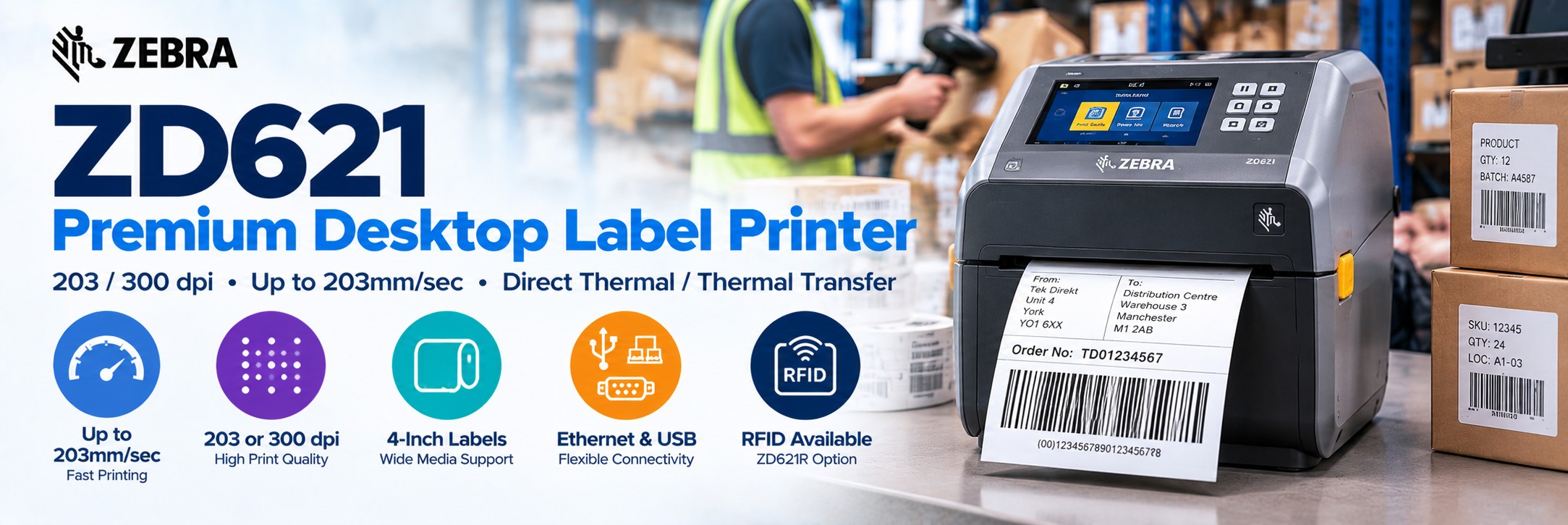
Zebra ZD621 Desktop Label Printer
Premium 4-inch desktop label printing with up to 203mm/sec print speed, 203 or 300dpi resolution and direct thermal or thermal-transfer options.
The Zebra ZD621 is designed for businesses that need more performance and flexibility from a compact desktop label printer.
It is well suited to barcode labels, shipping labels, product identification, inventory, asset tracking, healthcare and other applications where dependable label output is required throughout the working day.
The ZD621 family includes direct thermal, thermal transfer, healthcare and RFID configurations, so choosing the correct manufacturer part number is important.
Zebra ZD621 at a Glance
Up to 203mm/sec
203dpi models print at speeds up to 8 inches / 203mm per second.
203 or 300 dpi
Choose standard 203dpi or higher-resolution 300dpi printing according to label size and detail.
4-Inch Printing
Designed for common desktop barcode, shipping, inventory and product-label applications.
DT or TT
Choose direct thermal for shorter-life labels or thermal transfer where greater durability is required.
Ethernet
Core ZD621 models include Ethernet alongside USB and serial connectivity.
Optional Wireless
Wireless configurations are available for applications requiring Wi-Fi and Bluetooth connectivity.
300m Ribbons
Thermal-transfer models support long 300 metre ribbon rolls as well as 74 metre ribbons.
RFID Available
ZD621R configurations add UHF RFID label printing and encoding for suitable RFID applications.
Premium Desktop Label Printing
The ZD621 occupies the higher-performance end of Zebra's desktop printer range, making it suitable for businesses that want desktop convenience without moving immediately to a larger industrial printer.
Shipping
Print shipping, carton, courier and order-identification labels at packing stations.
Inventory
Produce barcode labels for products, stock locations, shelves, bins and assets.
Manufacturing
Print component, work-in-progress, product and traceability labels.
Retail
Produce product, price, inventory, click-and-collect and back-office labels.
ZD621 Direct Thermal or Thermal Transfer?
This is the first decision to make when choosing a Zebra ZD621.
Direct Thermal ZD621
No ribbon required.
Direct thermal printers create the image directly on heat-sensitive label material.
Good for: shipping labels, courier labels, short-life inventory labels, receipts and other applications where labels do not need to survive for long periods.
Advantages: fewer consumables and simple day-to-day operation.
Thermal Transfer ZD621
Uses a thermal-transfer ribbon.
The printhead transfers ink from the ribbon onto the label material, allowing more durable label combinations to be produced.
Good for: product identification, asset labels, manufacturing, inventory, durable barcode labels and longer-life applications.
Advantages: greater choice of label materials and improved durability.
203 dpi or 300 dpi?
Resolution affects both print detail and maximum printing speed.
203 dpi
Best for most everyday label applications.
203dpi provides good barcode and text quality while allowing the ZD621 to reach its maximum print speed of 203mm/sec.
Good for: shipping labels, warehouse labels, product labels, inventory and standard barcode printing.
300 dpi
Best where smaller or finer detail is required.
300dpi provides greater print density for smaller text, detailed graphics and compact barcode applications.
Maximum print speed on 300dpi configurations is 152mm/sec.
Higher dpi is not automatically better. For a conventional 4 × 6 inch shipping label, 203dpi is normally the more practical choice. Consider 300dpi when the label genuinely contains smaller or more detailed content.
Fast Desktop Printing up to 203mm/sec
The ZD621 offers considerably more performance than many basic desktop label printers while retaining a compact footprint.
203 dpi
Up to 203mm/sec / 8 ips
A strong option for shipping, warehousing and other applications where throughput matters.
300 dpi
Up to 152mm/sec / 6 ips
Trades some speed for increased print resolution and finer label detail.
Label & Media Support
The ZD621 can handle a wide range of desktop label media, allowing one printer family to cover many business applications.
Die-Cut Labels
Conventional individual labels supplied on a roll with gaps between each label.
Continuous Media
Continuous rolls allow label length to be controlled by the application.
Black-Mark Media
The printer includes sensing for compatible media using black registration marks.
Fan-Fold Labels
Externally supplied fan-fold media can be fed through the printer for suitable applications.
Tag Stock
Suitable configurations can print tags as well as conventional adhesive labels.
Receipt Paper
Continuous direct-thermal receipt media is supported for compatible applications.
Wristbands
Supported media types include wristbands, with specialist healthcare configurations also available.
Linerless
Dedicated linerless configurations are available within the broader ZD621 family.
Thermal Transfer Ribbon Options
Thermal-transfer ZD621 models support two ribbon formats.
300 Metre Ribbon
Best for regular label production.
The larger 300m ribbon reduces the frequency of ribbon changes and is useful where the printer produces labels throughout the working day.
Uses a 1-inch / 25.4mm ribbon core.
74 Metre Ribbon
Compact ribbon option.
Suitable for lower-volume use or applications where shorter ribbon rolls are preferred.
Uses a 0.5-inch / 12.7mm ribbon core.
Ribbon and label material need to be compatible with each other. Wax, wax/resin and resin ribbons serve different durability and material requirements.
ZD621 Connectivity
The ZD621 provides strong connectivity for desktop deployment and integration into existing business systems.
USB 2.0
Connect directly to a compatible PC, workstation or other host system.
USB Host
Supports compatible USB peripherals and deployment workflows.
Ethernet
Connect the printer to a wired business network for shared or centrally managed use.
Serial
RS-232 connectivity supports suitable legacy and specialist business systems.
Wireless options vary by configuration. Always check the complete Zebra MPN if Wi-Fi or Bluetooth connectivity is required.
Zebra ZD421 vs ZD621
Both are 4-inch Zebra desktop printers, but the ZD621 is the higher-performance family.
| Feature | Zebra ZD421 | Zebra ZD621 |
|---|---|---|
| Printer Class | Advanced desktop | Premium desktop |
| 203 dpi Speed | Up to 152mm/sec | Up to 203mm/sec |
| 300 dpi Speed | Up to 102mm/sec | Up to 152mm/sec |
| 203 dpi | Yes | Yes |
| 300 dpi | Available | Available |
| Direct Thermal | Yes | Yes |
| Thermal Transfer | Yes | Yes |
| Healthcare Models | Available | Available |
| RFID Model | — | ZD621R available |
| Best For | General desktop label printing | Higher-throughput and more demanding desktop applications |
ZD621 or an Industrial Label Printer?
The ZD621 provides impressive performance for a desktop printer, but there is still a point where an industrial printer becomes the better choice.
Choose ZD621
Compact desktop performance.
Ideal where labels are produced regularly but the printer does not need the larger media capacity, metal construction or continuous high-volume capability of an industrial machine.
Good for: packing desks, stockrooms, retail, laboratories, manufacturing workstations and office environments.
Consider an Industrial Printer
Higher-volume and harsher environments.
Move to an industrial printer where large media rolls, heavy daily output, demanding production environments or continuous high-volume printing are priorities.
For Zebra, models such as the ZT231 and ZT411 are logical next steps.
Zebra ZD621-HC Healthcare Label Printer
Specialist ZD621-HC configurations are designed for healthcare environments and extend the standard desktop platform with healthcare-focused construction.
Healthcare Plastics
Specialist housing is designed to withstand compatible hospital cleaning and disinfecting chemicals.
Medical Power Supply
Healthcare models use a healthcare-compliant IEC 60601-1 certified power supply.
Healthcare Labelling
Suitable applications can include patient identification, specimen labels, pharmacy labels and other healthcare workflows.
Zebra ZD621R RFID Label Printer
For businesses moving beyond conventional barcode labels, the ZD621 family also includes a dedicated UHF RFID printing and encoding model.
Print + Encode
Produce conventional printed information while encoding compatible UHF RFID inlays.
RAIN RFID
The ZD621R supports compatible UHF EPC Gen 2 V2.1, ISO/IEC 18000-63 and RAIN RFID technology.
Adaptive Encoding
Zebra's Adaptive Encoding technology is designed to simplify RFID media setup and tag positioning.
What Can You Print with a Zebra ZD621?
Shipping Labels
Courier, address, order and dispatch labels for packing operations.
Barcode Labels
1D and 2D barcode labels for products, cartons, inventory and business processes.
Asset Labels
Longer-life identification labels when paired with suitable thermal-transfer media.
Product Labels
Product identification, SKU, price and internal tracking labels.
Warehouse Labels
Inventory, shelf, bin, tote and operational labels.
Manufacturing Labels
Components, work-in-progress, finished goods and traceability applications.
Healthcare Labels
Specialist healthcare models support patient, laboratory and pharmacy applications.
RFID Labels
ZD621R configurations add UHF RFID printing and encoding.
Zebra ZD621 Specifications
| Specification | Zebra ZD621 |
|---|---|
| Printer Type | 4-inch desktop label printer |
| Print Methods | Direct Thermal or Thermal Transfer depending on model |
| Resolution | 203 dpi or 300 dpi |
| 203 dpi Print Speed | Up to 203mm/sec / 8 ips |
| 300 dpi Print Speed | Up to 152mm/sec / 6 ips |
| Maximum Print Width | 104mm at 203dpi / 108mm at 300dpi |
| Maximum Label Length | Up to 991mm |
| Direct Thermal Media Width | 15mm to 108mm |
| Thermal Transfer Media Width | 15mm to 118mm |
| Maximum Media Roll Diameter | 127mm / 5 inches |
| Ribbon Length | 300m or 74m on thermal-transfer models |
| Memory | 512MB Flash / 256MB SDRAM |
| Standard Interfaces | Ethernet, Serial, USB 2.0, USB Host |
| BLE | Bluetooth Low Energy for supported printer setup functionality |
| Programming Languages | ZPL II, EPL 2 and supported Zebra languages |
| Media Sensors | Moveable reflective / black-mark and transmissive / gap sensing |
Which Zebra ZD621 Should I Buy?
There are many ZD621 configurations. Work through these choices before comparing prices.
1. Print Method
Choose direct thermal for short-life labels or thermal transfer for more durable applications.
2. Resolution
Choose 203dpi for most applications or 300dpi when smaller text and finer detail are required.
3. Connectivity
Check whether the deployment requires wired networking, USB, serial or optional wireless connectivity.
4. Media Handling
Determine whether standard tear-off operation is enough or whether a cutter or label dispenser is required.
5. Specialist Model
Check whether the application requires a standard ZD621, healthcare model or ZD621R RFID printer.
6. Labels & Ribbons
Choose compatible labels and, for thermal-transfer models, the correct ribbon formulation and width.
The complete MPN matters. “Zebra ZD621” alone does not identify the print method, resolution, connectivity or specialist options included with the printer.
Available Zebra ZD621 products and current pricing should remain directly below this guide.
ZD621 Configuration Guide
| Application | What Matters | Consider |
|---|---|---|
| Shipping labels | Speed and simplicity | 203dpi Direct Thermal |
| Warehouse labels | Barcode clarity and regular printing | 203dpi DT or TT depending on label life |
| Product identification | Longer label life | Thermal Transfer |
| Small detailed labels | Fine text / compact barcodes | 300dpi |
| Asset labels | Durability | Thermal Transfer + suitable durable media |
| Healthcare | Cleaning / healthcare environment | ZD621-HC |
| RFID inventory | UHF RFID encoding | ZD621R |
| Higher-volume production | Media capacity / industrial durability | Consider ZT231 or ZT411 |
Zebra ZD621 FAQs
Is the Zebra ZD621 direct thermal?
It can be. The ZD621 family includes both direct-thermal and thermal-transfer models, so check the complete MPN before ordering.
Does the ZD621 print 4 × 6 shipping labels?
Yes. The ZD621 is a 4-inch desktop printer suitable for conventional shipping-label applications when configured with compatible media.
Should I choose 203 or 300dpi?
203dpi is suitable for most standard shipping and barcode labels. Consider 300dpi for smaller labels, fine text or applications requiring greater print detail.
How fast is the Zebra ZD621?
203dpi configurations print at up to 203mm/sec. 300dpi configurations print at up to 152mm/sec.
What is the difference between ZD421 and ZD621?
The ZD621 is Zebra's higher-performance 4-inch desktop family and offers faster maximum print speeds, as well as specialist configurations including RFID.
Can the ZD621 print RFID labels?
The standard ZD621 is not an RFID encoder. Choose the specialist ZD621R configuration when UHF RFID printing and encoding are required.
Buy Zebra ZD621 Label Printers from Tek Direkt
Exact MPN Sourcing
Send us the complete Zebra manufacturer part number and quantity and we'll provide a price.
Configuration Help
Compare direct thermal vs thermal transfer, 203 vs 300dpi, connectivity and specialist models before ordering.
Labels & Ribbons
Source compatible labels and thermal-transfer ribbons alongside the printer.
Single Printers or Rollouts
Buy one replacement printer or request pricing for larger warehouse, retail, healthcare or multi-site deployments.
Need a Price on Zebra ZD621 Label Printers?
Send us the Zebra MPN and quantity and we'll provide a price.
Not sure which configuration you need? Tell us what you're printing, your label size, whether the labels need to be durable and approximately how many you print each day.
Already have another supplier's quote? Send that over too.
No calls. No meetings. No messing about. Just another price.
Request a ZD621 Quote