
Zebra MC3400 & MC3450 Mobile Computers
Rugged Android mobile computers built for scan-intensive warehouse, manufacturing and logistics operations.
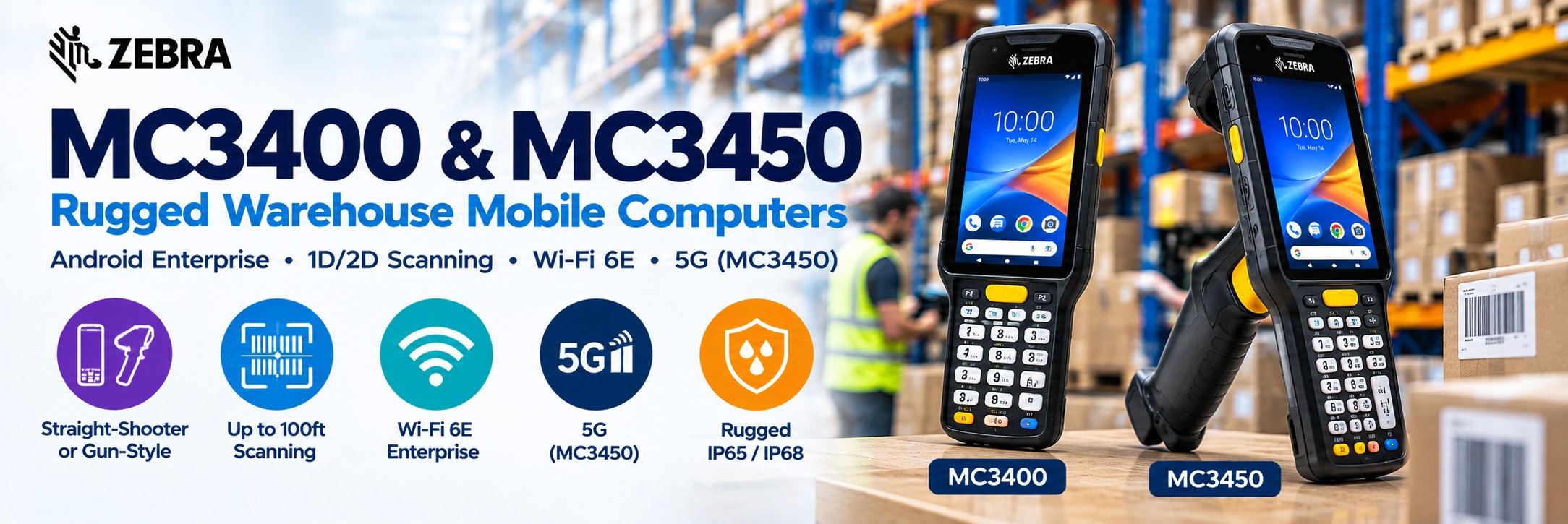
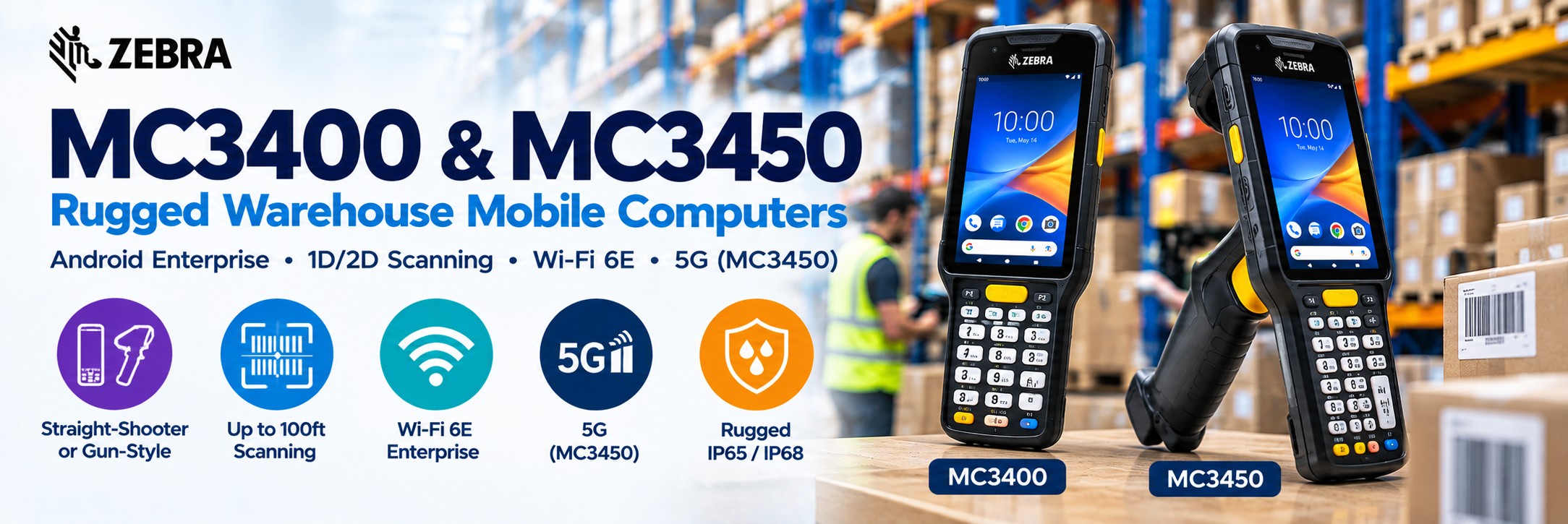
The Zebra MC3400 and MC3450 combine professional 1D/2D barcode scanning, physical keypad data entry, Wi-Fi 6E and rugged warehouse-focused ergonomics in the latest generation of Zebra's established MC3000 Series.
Choose from straight-shooter or gun-style designs, multiple keypad layouts and scan engines ranging from standard-range capture through to extended-range scanning of barcodes up to 100ft away.
MC3400 is the Wi-Fi model. Choose the MC3450 when workers also need 5G cellular connectivity.
Zebra MC3400 & MC3450 Rugged Android Handheld Computers
The Zebra MC3400 and MC3450 are rugged Android handheld computers designed around warehouse, manufacturing and logistics workflows. Unlike smartphone-style enterprise devices, the MC3400 family combines a touchscreen with physical keypad options and scan-focused ergonomics for employees performing frequent barcode capture and operational data entry.
Zebra MC3400
Wi-Fi rugged mobile computer for warehouse and manufacturing environments covered by enterprise WLAN.
Zebra MC3450
5G-capable version for workflows extending into yards, ports, outdoor areas and other locations beyond warehouse Wi-Fi.
Rugged Android Platform
Designed for scan-intensive enterprise applications requiring Android, physical keys and professional barcode scanning.
Zebra MC3400 Series at a Glance
1D & 2D Scanning
Four Zebra scan-engine choices cover standard, indoor/outdoor, advanced and extended-range barcode capture.
Up to 100ft Scanning
SE58 Extended Range configurations can capture suitable barcodes at distances up to 100ft.
Wi-Fi 6E
Modern tri-band enterprise wireless connectivity for warehouse, manufacturing and operational environments.
5G on MC3450
The MC3450 adds cellular connectivity for yards, ports and operations extending beyond enterprise Wi-Fi.
Physical Keypads
Choose 29-key, 38-key or 47-key layouts according to the data workers enter throughout a shift.
Two Form Factors
Choose a straight-shooter handheld or gun-style configuration for scan-intensive work.
7,000mAh Battery
PowerPrecision+ extended-capacity battery technology supports demanding full-shift operation.
Up to 6GB / 128GB
Multiple memory tiers allow hardware to be matched to the applications and deployment requirements.
Built for Scan-Intensive Warehouse Work
The MC3400 Series is fundamentally different from smartphone-style mobile computers. Its physical controls and scan-focused ergonomics are designed around workers repeatedly capturing barcodes and entering operational data.
Picking
Scan product and location barcodes while working through warehouse picking tasks.
Put-Away
Capture product and storage-location information as stock is moved into the warehouse.
Inventory
Use physical keypad entry and barcode scanning for stock counts and inventory management.
Shipping & Receiving
Capture cartons, pallets, shipments and inventory as goods enter or leave the facility.
Choose the Right MC3400 Barcode Scanner
One of the biggest advantages of the MC3400 family is the choice of scan engines. The correct option depends on how far workers are from the barcode and the conditions in which they scan.
SE4710
Standard Range
For conventional 1D and 2D barcode scanning where workers are normally close to products, cartons and labels.
Good for: picking, packing, receiving and everyday inventory.
SE4770
Indoor / Outdoor
Designed for barcode capture across indoor and outdoor operating environments.
Good for: warehouses, loading areas and operations moving between indoor and outdoor locations.
SE55
Advanced Range
Provides flexible barcode capture from items close to the worker through to suitable barcodes up to approximately 40ft away.
Good for: warehouse shelving, pallets and variable-distance scanning.
SE58
Extended Range
Designed for demanding long-range applications, with suitable barcode capture at distances up to approximately 100ft.
Good for: high racking, yards, ports and long-range warehouse scanning.
Don't pay for scanning range you don't need. If workers normally scan labels at arm's length, a standard-range engine may be entirely appropriate. SE55 and SE58 become valuable when the same worker needs to capture barcodes across much greater distances.
Straight-Shooter or Gun-Style?
Straight-Shooter
Best for mixed mobile-computing tasks.
The conventional handheld format is useful where workers alternate between scanning, keypad entry, screen interaction and carrying the device.
Consider for: inventory, goods receiving, stock checks, manufacturing and general warehouse workflows.
Gun-Style
Best for repetitive scanning.
The integrated pistol grip provides a dedicated trigger and more natural hand position for workers capturing large numbers of barcodes throughout a shift.
Consider for: high-volume picking, shipping, receiving and scan-intensive warehouse operations.
For a worker scanning hundreds or thousands of barcodes during a shift, ergonomics can matter as much as processor speed. Choose the form factor around the actual workflow.
29-Key, 38-Key or 47-Key Keypad?
Physical keypad choice is another major reason businesses choose the MC3400 family over touchscreen-only devices.
29-Key
Numeric-focused workflows.
Consider where employees primarily enter quantities, location numbers and other numerical information.
38-Key
Flexible operational entry.
A useful middle ground where employees need more than simple numeric input without requiring the largest keypad layout.
47-Key
More extensive data entry.
Provides additional physical keys for workflows requiring broader alphanumeric or application interaction.
Zebra has increased key size and optimised key spacing on the MC3400 Series to support accurate data entry, including operation while wearing compatible gloves.
Zebra MC3400 vs MC3450
The two models share the same core platform. The main buying difference is cellular connectivity.
| Feature | Zebra MC3400 | Zebra MC3450 |
|---|---|---|
| Wi-Fi | Yes | Yes |
| Wi-Fi 6E | Yes | Yes |
| 5G Cellular | No | Yes |
| Private 5G | No | Supported configurations |
| Bluetooth | Yes | Yes |
| Straight-Shooter | Yes | Yes |
| Gun Form | Yes | Yes |
| Physical Keypads | 29 / 38 / 47 key options | 29 / 38 / 47 key options |
| Typical Environment | Warehouse / manufacturing within Wi-Fi coverage | Warehouse / manufacturing / yard / port / outdoor operations |
Simple rule: choose MC3400 where enterprise Wi-Fi covers the working environment. Consider MC3450 when workers also need cellular connectivity outside that WLAN coverage.
Modern Performance for Enterprise Android
Qualcomm 4490
Octa-core 2.4GHz processor provides the performance required for modern warehouse and enterprise applications.
4GB / 64GB
Standard-tier memory configuration for conventional enterprise applications.
6GB / 64GB
Expanded memory tier for more demanding application requirements.
6GB / 128GB
Full-featured memory tier provides additional storage for larger or longer-term deployments.
4-Inch Touchscreen + Physical Keypad
The MC3400 takes a different approach from smartphone-style enterprise computers: the touchscreen provides modern Android application access while the physical keypad remains available for rapid operational data entry.
4-Inch Display
10.2cm WVGA colour touchscreen with 800 × 480 resolution.
350 / 600 Nits
Display brightness varies by configuration tier, with brighter options available for more demanding viewing environments.
Physical Input
Workers don't need to rely exclusively on an on-screen keyboard when repeatedly entering operational information.
7,000mAh PowerPrecision+ Battery
The MC3400 and MC3450 use Zebra's 7,000mAh extended-capacity PowerPrecision+ battery platform for demanding full-shift operations.
7,000mAh Capacity
25.2Wh battery capacity is designed around demanding warehouse and enterprise shifts.
Hot-Swappable
Battery-swapping capability helps keep devices in operation during extended or multi-shift workflows.
BLE Battery Option
A Bluetooth-enabled battery option can support device-location functionality even when the mobile computer is powered off when used with the appropriate Zebra services.
Upgrading from MC3300 or MC3300ax?
The MC3400 Series continues Zebra's established MC3000 platform and provides an upgrade path for businesses already using earlier devices.
Battery Compatibility
Current MC34 7,000mAh batteries are backwards compatible with MC3300ax and MC3300x devices.
Legacy Batteries
Selected MC33 legacy batteries can also operate in MC3400/MC3450 devices, although Zebra states that using them results in reduced ingress-protection sealing.
If you're replacing an existing MC3300 deployment, send us the current device, cradle and accessory MPNs. Compatibility should be checked before assuming every existing accessory can be retained.
MC3400 vs Zebra TC53
Both are professional Zebra Android mobile computers, but they are designed around different styles of work.
Choose MC3400
Warehouse-first ergonomics.
Choose the MC3400 where physical keypad entry, gun-style options and frequent barcode scanning are central to the workflow.
Typical applications: warehouse picking, manufacturing, receiving, replenishment and inventory.
Choose TC53
Touchscreen-first enterprise mobility.
Consider the TC53 where workers benefit more from a larger smartphone-style touchscreen and spend more time interacting with Android applications.
Typical applications: retail, logistics, mobile applications and mixed enterprise workflows.
MC3400 vs Zebra MC9450
MC3400 / MC3450
Rugged warehouse mobile computing.
A strong choice for conventional warehouse, manufacturing, inventory and logistics operations requiring keypad entry and professional barcode scanning.
MC9450
Ultra-rugged industrial mobile computing.
Consider the MC9450 family for especially demanding warehouse, yard and industrial environments requiring Zebra's higher-tier ultra-rugged platform.
Where Is the MC3400 Series Used?
Warehousing
Picking, put-away, replenishment, inventory, receiving and dispatch.
Manufacturing
Component tracking, work-in-progress, production data and material movement.
Logistics
Cross docking, shipment handling, reverse logistics and pallet identification.
Yards & Ports
MC3450 cellular connectivity and extended-range scanning can support suitable outdoor operational workflows.
Zebra MC3400 & MC3450 Accessories
Plan the complete deployment rather than purchasing the mobile computer alone.
Charging Cradles
Single-slot and multi-slot charging options support individual devices and larger warehouse fleets.
Spare Batteries
Keep charged 7,000mAh batteries available for extended and multi-shift operations.
Battery Chargers
Charge spare batteries independently from the mobile computers.
Holsters & Carrying
Keep straight-shooter devices accessible while allowing workers to free their hands.
Zebra MC3400 & MC3450 Specifications
| Specification | MC3400 / MC3450 |
|---|---|
| Device Type | Rugged Android mobile computer |
| Form Factors | Straight-shooter and gun-style |
| Display | 4-inch / 10.2cm WVGA colour touchscreen |
| Resolution | 800 × 480 |
| Display Brightness | 350 nits or 600 nits depending on configuration tier |
| Processor | Qualcomm 4490 octa-core, 2.4GHz |
| Memory | 4GB/64GB, 6GB/64GB or 6GB/128GB depending on configuration |
| Operating System | Android |
| Barcode Scanning | SE4710, SE4770, SE55 or SE58 depending on configuration |
| Maximum Scan Range | Up to approximately 100ft with suitable SE58 configuration and barcode |
| Wi-Fi | Wi-Fi 6E |
| Bluetooth | Bluetooth 5.3 / BLE |
| Cellular | MC3450: 5G data connectivity |
| Keypads | 29-key, 38-key or 47-key options |
| Battery | 7,000mAh / 25.2Wh PowerPrecision+ |
| Battery Swap | Hot-swappable |
Which Zebra MC3400 or MC3450 Should I Buy?
There are substantially different configurations within the family. Work through these decisions before comparing prices.
1. MC3400 or MC3450?
Choose Wi-Fi-only MC3400 or cellular-enabled MC3450 according to where the device will operate.
2. Straight or Gun?
Choose the straight-shooter for mixed device use or gun form for frequent repetitive scanning.
3. Which Scan Engine?
Choose SE4710, SE4770, SE55 or SE58 according to environment and scanning distance.
4. Which Keypad?
Choose 29, 38 or 47 keys according to the type and amount of physical data entry required.
5. Which Memory?
Compare 4GB/64GB, 6GB/64GB and 6GB/128GB tiers according to application requirements.
6. Which Accessories?
Plan charging, batteries and carrying equipment at the same time as the mobile computers.
The complete MPN matters. Two products called “MC3400” can differ significantly in form factor, keypad, scan engine, display, memory, cameras and other factory options.
Available Zebra MC3400 and MC3450 products and current pricing are shown directly below this guide.
MC3400 Configuration Guide
| Application | What Matters Most | Configuration to Consider |
|---|---|---|
| Standard warehouse picking | Frequent close-range scanning | MC3400 + gun form + SE4710 |
| Mixed warehouse duties | Scanning + data entry | MC3400 straight-shooter |
| Indoor / outdoor operations | Variable lighting conditions | Consider SE4770 |
| Warehouse racking | Near and distant scanning | Consider SE55 |
| High-rack warehouse | Extended-range scanning | Consider SE58 |
| Yard / port operation | 5G + extended scanning | MC3450 + appropriate scan engine |
| Quantity-heavy data entry | Physical numeric input | Consider numeric-focused keypad |
| Complex data entry | More physical keys | Consider 47-key configuration |
Zebra MC3400 & MC3450 FAQs
What is the difference between MC3400 and MC3450?
The MC3400 is designed around Wi-Fi connectivity. The MC3450 adds 5G cellular connectivity for operations extending beyond enterprise WLAN coverage.
How far can the MC3400 scan?
It depends on the scan engine. Zebra offers configurations ranging from standard-range SE4710 through to SE58 Extended Range, which can capture suitable barcodes at distances up to approximately 100ft.
Does the MC3400 have a physical keyboard?
Yes. Zebra provides 29-key, 38-key and 47-key keypad configurations.
Is there a pistol-grip MC3400?
Yes. The family is available in straight-shooter and gun-style form factors.
Does the MC3400 support Wi-Fi 6E?
Yes. The MC3400 Series supports tri-band Wi-Fi 6E connectivity.
Can MC3300 batteries be reused?
There is some battery compatibility across the MC3000 family, but Zebra notes that using selected legacy MC33 batteries in an MC3400/MC3450 reduces ingress-protection sealing. Check the exact battery MPN before reuse.
Buy Zebra MC3400 & MC3450 from Tek Direkt
Exact MPN Sourcing
Send us the complete Zebra manufacturer part number and quantity and we'll provide a price.
Configuration Help
Compare form factor, keypad, scanning range, memory and connectivity before ordering.
Upgrade Planning
Replacing MC3300-series devices? Send us your existing device and accessory MPNs so the new configuration can be checked.
Single Devices or Rollouts
Buy individual replacements or request pricing for larger warehouse, manufacturing or multi-site deployments.
Compare Rugged Mobile Computers
Compare the MC3400 and MC3450 with touchscreen and ultra-rugged mobile-computer families, or explore our wider Android and warehouse mobile-computing ranges.
Need a Price on Zebra MC3400 or MC3450?
Send us the Zebra MPN and quantity and we'll provide a price.
Not sure which configuration you need? Tell us whether you require Wi-Fi or 5G, straight-shooter or gun form, approximate scanning distance and the type of keypad your operators use.
Already have another supplier's quote? Send that over too.
No calls. No meetings. No messing about. Just another price.
Request an MC3400 / MC3450 Quote