
Mobile Computer Buyer's Guide: Android & Rugged Handheld Computers
Mobile computers combine barcode scanning, computing and wireless connectivity in one handheld device. They're widely used for warehouse picking, stock control, retail, manufacturing, logistics, delivery and field-service applications.
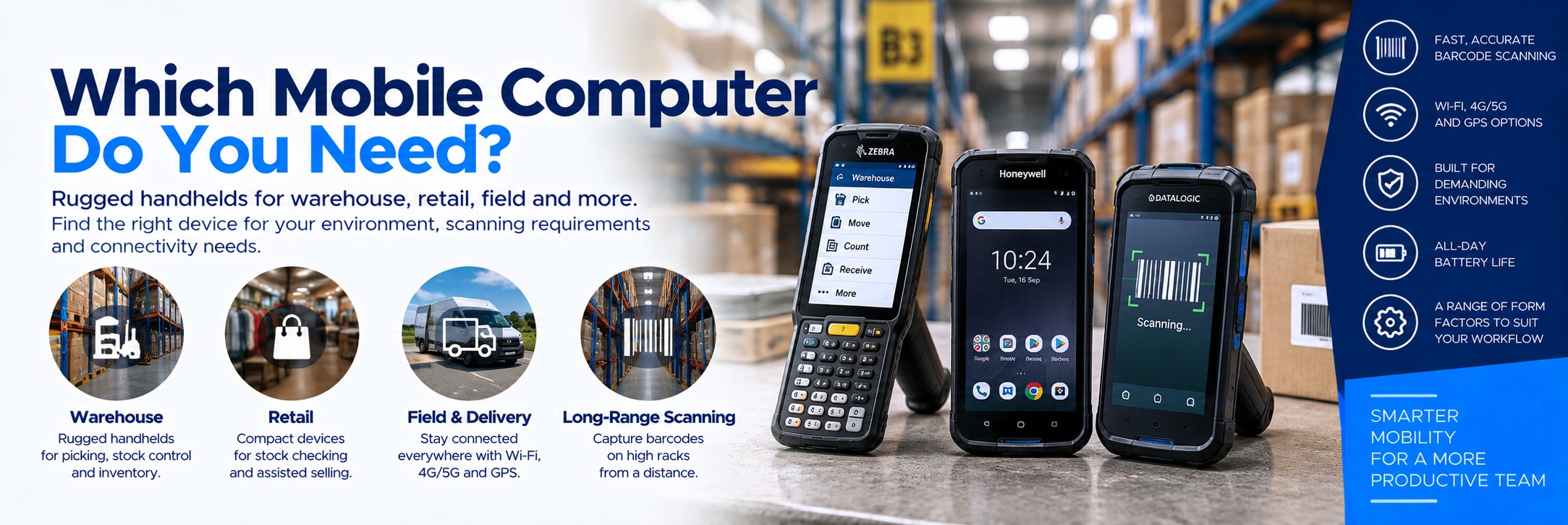
The right device depends on where it will be used, what needs scanning, how far away the barcodes are, whether users need a physical keyboard and whether the device stays on-site or needs mobile data away from Wi-Fi.
Choose the Right Mobile Computer for Your Application
Mobile computers range from compact Android handhelds for retail and general business use to rugged warehouse computers designed for intensive scanning, physical data entry and demanding environments.
ANDROID
Android Mobile Computers
Touchscreen enterprise handhelds combining Android applications, wireless connectivity and professional barcode scanning.
WAREHOUSE
Warehouse Mobile Computers
Rugged handheld computers for picking, receiving, put-away, replenishment, inventory and dispatch.
RUGGED
Rugged Handheld Computers
Enterprise mobile computers designed for tougher warehouse, manufacturing, logistics and field-service environments.
Quick Answer: Which Mobile Computer Do I Need?
Warehouse Picking
Rugged handheld with dedicated barcode imager.
Consider a pistol grip or physical keypad where scanning is frequent.
Retail
Compact touchscreen mobile computer.
Ideal for stock checking, inventory, assisted selling and back-room tasks.
Delivery & Field Work
Rugged device with cellular connectivity.
Consider 4G/5G, GPS and a suitable camera alongside barcode scanning.
Long-Range Scanning
Extended-range scan engine.
Useful where users need to capture barcodes on high warehouse racks without getting close to them.
For most buyers, start with five questions: Where will it be used? What barcodes will it scan? How far away are they? Does it need mobile data? Does the user need a touchscreen, physical keypad or pistol grip?
What Is a Mobile Computer?
A mobile computer is a handheld business device designed to capture and process data while employees are moving around a workplace or working in the field.
Unlike a basic barcode scanner, a mobile computer can run applications directly on the device, display information to the user and communicate with business systems over wireless networks.
Barcode Scanning
Built-in scan engines capture 1D and 2D barcodes quickly without requiring a separate handheld scanner.
Business Applications
Run warehouse, inventory, retail, logistics and field-service applications directly on the device.
Wireless Connectivity
Connect to business systems using Wi-Fi and, on suitable models, cellular networks.
Do you actually need a mobile computer?
If your team already has a PC, till or workstation and only needs to capture barcode data, a standalone barcode scanner may be a simpler option.
Our Barcode Scanner Selector helps you compare suitable scanners by barcode type, scanning distance, connectivity and working environment.
Try the Barcode Scanner Selector →Mobile Computer or Smartphone?
Modern mobile computers can look very similar to smartphones, but they're designed around commercial workflows rather than personal use.
| Feature | Rugged Mobile Computer | Consumer Smartphone |
|---|---|---|
| Barcode Scanning | Dedicated scan engine on suitable models | Usually relies on camera-based scanning |
| Scan Buttons | Dedicated physical trigger buttons | Normally touchscreen controls |
| Ruggedness | Designed for commercial environments | Designed primarily for consumer use |
| Accessories | Cradles, spare batteries, pistol grips and enterprise accessories may be available | Consumer accessory ecosystem |
| Product Lifecycle | Enterprise ranges may offer longer deployment continuity | Models can change frequently |
| Physical Keypad | Available on selected devices | Rare |
If an employee scans a barcode occasionally, a phone camera may be sufficient for the application. If they scan hundreds or thousands of items during a shift, a dedicated scan engine and physical scan buttons can make a major difference to the workflow.
1. Choose the Right Form Factor
VERSATILE
Touchscreen Handheld
Smartphone-style mobile computers combine a large touchscreen with dedicated enterprise scanning.
Best for: retail, inventory, field service, logistics and mixed applications.
WAREHOUSE
Keypad Mobile Computer
Physical keys can be useful for data-entry-heavy warehouse and manufacturing workflows.
Best for: picking, inventory, manufacturing and existing keyboard-driven applications.
HIGH-SCAN
Pistol-Grip Handheld
A gun-style grip provides a comfortable trigger position for employees performing continuous barcode scanning.
Best for: high-volume warehouse picking and scanning-intensive operations.
2. Standard Range or Extended Range Scanning?
One of the biggest mistakes when choosing a warehouse mobile computer is focusing on the device specification while ignoring the scan engine.
Standard-Range Scanning
Designed for normal handheld scanning where the user can bring the device relatively close to the barcode.
Typical applications:
- Product picking
- Stock checking
- Goods receiving
- Retail inventory
- Parcel scanning
Extended-Range Scanning
Designed to capture appropriate barcodes over a much wider range of distances.
Typical applications:
- High warehouse racking
- Pallet locations
- Forklift workflows
- Large distribution centres
- Scanning without climbing or repositioning
Don't buy on maximum scan distance alone. Real-world scanning depends on barcode size, symbology, print quality, lighting, angle and the exact scan engine.
3. 1D or 2D Barcode Scanning?
Most modern enterprise mobile computers use 2D area imagers capable of reading both traditional 1D barcodes and 2D codes.
1D Barcodes
Traditional linear barcodes are widely used for products, stock locations, logistics and asset identification.
2D Barcodes
QR codes, Data Matrix and other 2D formats can hold more information and are increasingly common across business applications.
Unless you have a very specific legacy requirement, choosing a device with a capable 2D imager generally provides greater flexibility.
FREE INTERACTIVE BUYING TOOL
Find the right mobile computer in a few clicks
Not sure which handheld device is right for your business? Our Mobile Computer Selector helps you explore suitable Zebra, Honeywell, Datalogic, Unitech and Panasonic models based on your working requirements.
✓ Touchscreen or keypad ✓ Scanning distance ✓ Wi-Fi or cellular ✓ Working environment
Try the Mobile Computer Selector → 4. Wi-Fi Only or Cellular?
Where the device is used determines what connectivity you need.
Wi-Fi Mobile Computer
Suitable where devices remain inside warehouses, shops, factories and other locations with appropriate wireless coverage.
Good for:
- Warehouses
- Retail stores
- Manufacturing
- Healthcare sites
- Indoor inventory
Cellular Mobile Computer
Suitable where users need data connectivity away from company Wi-Fi.
Good for:
- Delivery drivers
- Field service
- Transport
- Outdoor operations
- Mobile workforce applications
If a device never leaves a well-covered warehouse, paying for cellular capability may be unnecessary. If employees work on the road, Wi-Fi-only hardware can become restrictive.
5. Touchscreen or Physical Keyboard?
The answer depends heavily on your software and workflow.
Touchscreen
Modern Android interfaces work naturally with touch and provide more screen area for applications, images and forms.
Best for: modern applications, retail, field service and mixed workflows.
Physical Keypad
Dedicated keys can be faster where employees repeatedly enter quantities, location codes or other structured data.
Best for: warehouses, manufacturing and existing keyboard-driven applications.
Some mobile-computer families are available with multiple keypad configurations, so check the exact MPN rather than assuming every version of the device has the same keyboard.
6. How Rugged Does the Device Need to Be?
Ruggedness isn't simply about whether the casing feels strong.
Look at:
Drop Specification
Indicates the height and conditions under which the manufacturer has tested the device against repeated drops.
IP Rating
Indicates tested protection against ingress of dust and water. Compare the exact rating and what it means for your environment.
Operating Temperature
Important for cold stores, outdoor operations and unusually hot or cold industrial environments.
A retail stockroom and a refrigerated warehouse don't need the same level of ruggedness. Choose for the environment rather than automatically buying the toughest device available.
7. Battery Life and Shift Length
Battery capacity matters, but the real question is whether the device will comfortably complete the employee's working shift.
Battery consumption varies with:
Screen use
Brightness and screen-on time affect runtime.
Brightness and screen-on time affect runtime.
Barcode scanning
Heavy scanning adds to power consumption.
Heavy scanning adds to power consumption.
Wireless connectivity
Wi-Fi and cellular use affect battery demand.
Wi-Fi and cellular use affect battery demand.
Applications
Processor-intensive applications can reduce runtime.
Processor-intensive applications can reduce runtime.
Replaceable Batteries Can Matter
For multi-shift environments, a removable battery can allow a depleted battery to be replaced without taking the entire mobile computer out of service.
Also check whether charging cradles, multi-slot chargers and spare batteries are available for the device family.
8. Android Mobile Computers
Android is widely used across current enterprise handheld mobile computers and provides a familiar touchscreen environment for business applications.
Explore Android Mobile Computers →
For a commercial deployment, however, the Android version isn't the only consideration.
Application Support
Confirm your warehouse, retail or field-service application supports the device and Android environment.
Security Updates
Check the manufacturer's enterprise support and update strategy, particularly for long deployments.
Device Management
Large fleets may need enterprise mobility management or mobile device management capabilities.
9. Cameras, NFC and Other Features
Barcode scanning may be the main reason for buying the device, but other hardware can be important.
Camera
Useful for proof of condition, delivery evidence, documentation and field-service workflows.
NFC
Can support compatible contactless tags, cards and business applications.
GPS
Important for navigation and location-aware field applications on suitable cellular models.
Bluetooth
Allows compatible headsets, printers, scanners and other peripherals to connect wirelessly.
10. Don't Forget the Accessories
The handheld itself is only part of a mobile-computing deployment.
Charging Cradles
Single-slot and multi-slot cradles can simplify charging and device storage between shifts.
Spare Batteries
Useful for intensive and multi-shift environments where devices cannot wait to recharge.
Pistol Grips
Some touchscreen mobile computers can accept optional trigger handles for scanning-intensive applications.
Protective Boots
Additional protection may be available for particularly demanding environments.
Vehicle Cradles
Useful for delivery, transport and field-service applications.
Holsters & Straps
Help employees carry and access devices throughout the working day.
When comparing quotes, check whether they include only the mobile computer or also the batteries, charging cradles, power supplies and other accessories required to deploy it.
11. Mobile Computers for Warehouses
Warehouse deployments usually put the greatest emphasis on scanning performance, ruggedness, battery life and ergonomics.
Picking
Fast barcode capture and comfortable repetitive scanning.
Fast barcode capture and comfortable repetitive scanning.
Put-away
Scan stock and warehouse locations as goods are stored.
Scan stock and warehouse locations as goods are stored.
Goods receiving
Capture incoming stock, cartons and pallets.
Capture incoming stock, cartons and pallets.
Stock counts
Update inventory while employees move around the warehouse.
Update inventory while employees move around the warehouse.
High-rack scanning
Consider extended-range scan engines where required.
Consider extended-range scan engines where required.
Multi-shift use
Consider removable batteries and multi-slot charging.
Consider removable batteries and multi-slot charging.
12. Mobile Computers for Retail
Retail mobile computers often prioritise compact size, a good touchscreen and enough ruggedness for all-day commercial use without becoming unnecessarily bulky.
Common applications include:
Stock Checking
Check inventory and product availability from the shop floor.
Price Checking
Scan products and access current product information.
Inventory
Perform stock counts without taking products to a fixed workstation.
Click & Collect
Support order picking and customer collection workflows.
Assisted Selling
Give staff access to product and stock information while speaking with customers.
Back Room
Receive deliveries and manage stock away from the main checkout.
13. Mobile Computers for Field Service & Delivery
Once employees leave company Wi-Fi, connectivity and battery life become more important.
Look for appropriate configurations offering:
Cellular data
4G or 5G connectivity where supported and required.
4G or 5G connectivity where supported and required.
GPS
Navigation and location-aware applications.
Navigation and location-aware applications.
Camera
Capture proof of delivery, condition or completed work.
Capture proof of delivery, condition or completed work.
Rugged construction
Protection against drops and outdoor working conditions.
Protection against drops and outdoor working conditions.
All-day battery
Avoid devices becoming unusable midway through a route.
Avoid devices becoming unusable midway through a route.
Vehicle charging
Useful for delivery and service fleets.
Useful for delivery and service fleets.
14. Popular Mobile Computer Brands
Zebra Mobile Computers
Zebra offers touchscreen, keypad and ultra-rugged mobile-computer families for retail, warehouse, logistics and field applications.
Honeywell Mobile Computers
Honeywell produces enterprise handheld computers for retail, warehouse, logistics and field workflows, with different ruggedness and connectivity options.
Datalogic Mobile Computers
Datalogic offers rugged Android mobile computers designed for data capture across retail, manufacturing, transport and logistics.
15. Which Zebra Mobile Computer?
Zebra has several mobile-computer families aimed at different levels of ruggedness and different working environments.
| Family | Best Suited To | Why Consider It |
|---|---|---|
| TC22 / TC27 | Retail, light field work, general business | Compact smartphone-style enterprise handheld; TC27 configurations add wide-area cellular capability |
| TC53 / TC58 | Retail, logistics, field service | Higher-tier rugged touchscreen platform; TC58 configurations provide cellular connectivity |
| TC73 / TC78 | Transport, logistics, demanding field work | More rugged platform for tougher environments; TC78 configurations add cellular connectivity |
| MC3400 / MC3450 | Warehouse and manufacturing | Keypad-focused industrial handheld family suited to scan-intensive workflows |
| MC9400 / MC9450 | Very demanding warehouse and industrial applications | Ultra-rugged mobile-computing family for intensive enterprise use |
Popular Mobile Computer Families
Compare mobile-computer families by working environment and form factor before selecting the exact manufacturer part number.
Mobile Computer Buying Checklist
Environment
Retail, warehouse, factory, vehicle or outdoors?
Retail, warehouse, factory, vehicle or outdoors?
Scan range
Close-range product scanning or distant warehouse locations?
Close-range product scanning or distant warehouse locations?
Barcode types
Which 1D and 2D symbologies need to be captured?
Which 1D and 2D symbologies need to be captured?
Form factor
Touchscreen, keypad or pistol-grip workflow?
Touchscreen, keypad or pistol-grip workflow?
Connectivity
Wi-Fi only or cellular data?
Wi-Fi only or cellular data?
Ruggedness
What drops, dust, water and temperatures will it encounter?
What drops, dust, water and temperatures will it encounter?
Battery
Will it comfortably cover the full shift?
Will it comfortably cover the full shift?
Accessories
Cradles, spare batteries, grips, holsters or vehicle charging?
Cradles, spare batteries, grips, holsters or vehicle charging?
Software
Is your business application compatible?
Is your business application compatible?
Exact MPN
Are suppliers quoting the same scan engine and configuration?
Are suppliers quoting the same scan engine and configuration?
Mobile Computer FAQs
What is a mobile computer?
A mobile computer is a handheld business device that combines computing, wireless connectivity and, in many models, dedicated barcode scanning. It can run applications directly on the device while employees work away from a fixed workstation.
What is the difference between a barcode scanner and a mobile computer?
A barcode scanner primarily captures barcode data and sends it to another system. A mobile computer can scan the barcode, run the business application, display information and communicate with backend systems from the same handheld device.
Why not just use a smartphone?
Consumer smartphones can work for occasional scanning, but enterprise mobile computers can offer dedicated scan engines, physical scan buttons, greater ruggedness, replaceable batteries and commercial charging and mounting accessories.
Do I need a pistol grip?
Not necessarily. A pistol grip becomes particularly useful where an employee performs large numbers of scans throughout a shift. For lighter scanning, a standard handheld form factor may be more convenient.
Do I need long-range barcode scanning?
Only if users need to scan suitable barcodes from significantly greater distances, such as warehouse rack locations. Standard-range scanning is sufficient for many product, parcel and inventory workflows.
Should I buy Wi-Fi or 5G mobile computers?
For devices that stay inside a warehouse or store with suitable Wi-Fi, a Wi-Fi configuration may be enough. Field workers, delivery drivers and other mobile employees may benefit from a cellular model.
How rugged should a warehouse mobile computer be?
That depends on the warehouse. Consider drop specifications, IP ratings, operating temperature and how the device will actually be handled rather than buying solely on a rugged marketing label.
Can mobile computers scan QR codes?
Models equipped with an appropriate 2D imager can generally capture QR codes as well as many other 1D and 2D barcode symbologies. Check the exact device specification for the codes your application uses.
Which mobile computer is best for warehouse picking?
For high-volume warehouse picking, look for a rugged device with a capable scan engine, comfortable ergonomics, sufficient battery life and the appropriate touchscreen, keypad or pistol-grip configuration for your workflow.
Can Tek Direkt quote for multiple mobile computers?
Yes. If you already know the manufacturer part number and quantity required, send them to us and we can provide another business price to compare.
MORE FREE BUYING TOOLS
Explore all Tek Direkt Product Finders
Need help choosing other business hardware? Explore our interactive tools for barcode scanners, label printers, mobile printers, mobile computers and Epson printing solutions.
Explore All Product Finders →Buying Mobile Computers?
If you already have the manufacturer part number and quantity, send them over and we'll see what we can do on the hardware price.
If you're still choosing, tell us the application, working environment, scan range and whether you need Wi-Fi or cellular connectivity.
No calls. No meetings. No messing about. Just another price to compare.