
For warehouses, fulfilment centres & logistics teams
Warehouse Colour Label Printing
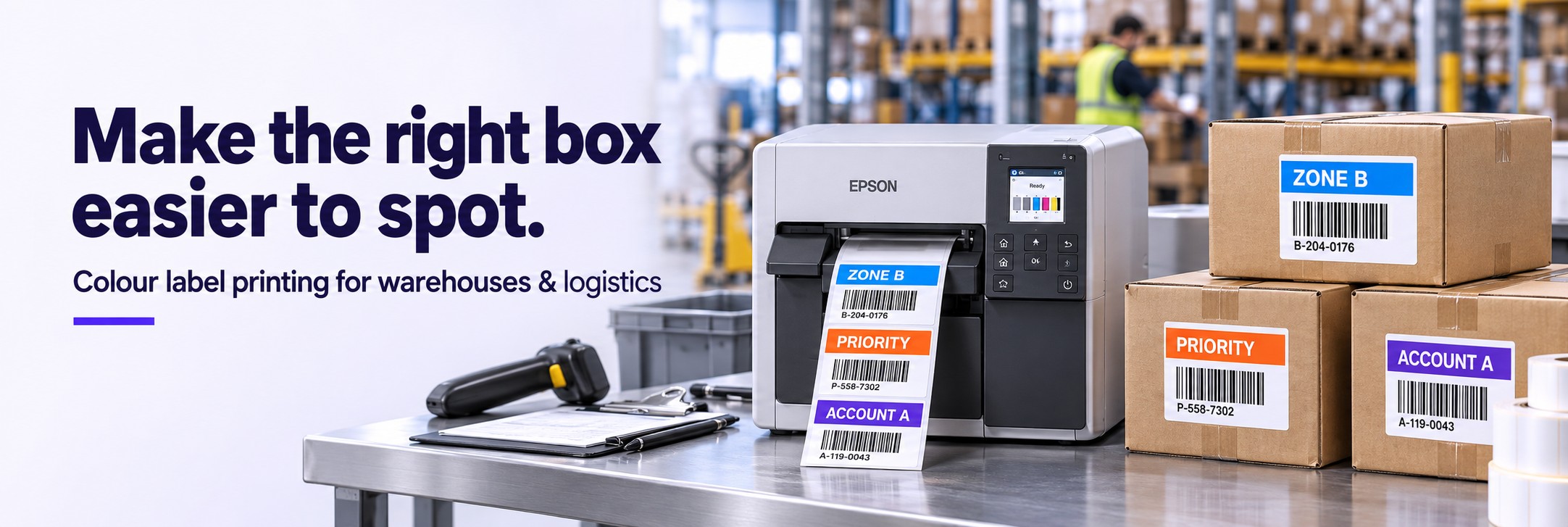
Make the right box easier to spot.
When every carton looks similar, a clear visual cue can help staff recognise the destination, customer or handling requirement before checking the detail.
Use Epson ColorWorks to print colour, readable text and barcodes together on compatible blank labels. Create the label for the job instead of selecting from separate stocks of pre-printed designs.
Send a sample label, its dimensions and your typical daily quantity. We can start by email.
Give each label a clear purpose
DESTINATION: ZONE B
Destinations & staging areas
Pair a colour band with a written zone or route code to help teams distinguish cartons at sorting and despatch points.
PRIORITY: TODAY
Order priorities
Make a time-sensitive order more noticeable with a prominent priority field, supported by the actual despatch date or cut-off time.
CUSTOMER: ACCOUNT A
Multiple customer accounts
Give each account an identifiable label layout while keeping the customer name, order reference and barcode visible.
STATUS: INSPECTION
Returns & inspection
Use a clearly written status to distinguish goods awaiting assessment from goods ready for the next stage of your process.
These are illustrative internal codes, not an industry standard. Agree meanings with your team and always pair colour with text or symbols.
Keep the visual cue and the job details together
Design the label around the decision staff need to make at that point in the workflow. Put the route, customer or status in a consistent position, with the supporting details underneath.
- Destination, staging area or customer identification
- Order references, carton numbers and handling instructions
- Barcodes or QR codes generated through suitable labelling software
- Job-specific dates and information from an approved data source
Keep barcodes high-contrast with their required clear margins. Test printed labels using your scanners at the distances and lighting conditions staff actually work in.
Where colour could help your operation
3PL & fulfilment
Distinguish customer accounts, packing requirements and special jobs within a shared facility.
Distribution centres
Make route or staging information prominent at the point where goods are sorted for onward movement.
Manufacturing stores
Identify work orders, parts containers and inspection stages with a consistent combination of text, colour and machine-readable data.
Choose the printer around the label and the workload
Epson ColorWorks C4000e
Compact desktop printing.
Consider for a dedicated workstation producing smaller batches of colour identification labels. Maximum print width: 108 mm.
Epson ColorWorks C6000
Flexible 4-inch labelling.
Maximum print width: 108 mm. Choose between auto-cutter and peeler variants according to how staff or equipment will handle the labels.
Epson ColorWorks C6500
More room for larger layouts.
Maximum print width: 212 mm. Consider when a larger label needs space for prominent routing information and supporting detail.
Check the exact variant, media specification and required print quality. Batch turnaround depends on label size and print settings. Software integration and automatic application need separate assessment.
Start with one process you can measure
Choose a single staging area, customer account or returns workflow. Record the current time spent selecting labels, checking cartons or correcting routing mistakes, then trial the revised label with the people doing the job.
Check readability, scan performance and adhesion before widening the trial. Compare the result with the cost of the printer, ink, media and operator time.
Warehouse colour labelling questions
Does this replace our carrier shipping labels?
It can sit alongside your existing shipping-label process. Keep carrier-required layouts and barcodes unchanged unless the carrier has approved an alternative. Internal colour labels must not obscure them.
Can it work with our warehouse management system?
The connection needs checking against your WMS, label software, printer drivers and data format. Send details of your current setup so the requirements can be assessed before you select hardware.
Will the labels suit cold or damp areas?
Choose the material and adhesive for the surface, application temperature and storage conditions. Test the complete printed label in the intended environment before rolling it out.
Should every warehouse label be printed in colour?
Use colour where it supports a specific task. Existing monochrome thermal labels may remain suitable for routine shipping and identification. A focused trial will show where colour adds value.
Show us the label your team works with
Email your current label, the problem you want to solve, label dimensions and approximate daily volume. Include your software and scanner models if relevant, and we can help you compare printer options.